

Quick answer: AI can turn a meeting recording into a useful first draft, but good minutes still require a short human review. A dependable workflow is: define the output, capture clear audio, create the transcript, verify names and commitments, convert the verified text into decisions and action items, then share the reviewed document. UMEVO Note Plus and the AI DVR Link app support this record-to-actions path without requiring a meeting bot to join the conversation.
Transparency note: UMEVO publishes this guide and sells UMEVO Note Plus. Product and app behavior described here comes from current UMEVO documentation, not an independent laboratory test. The five-minute review is a workflow target for a prepared editor after the transcript is available; it is not a guaranteed processing time or accuracy promise.
Updated September 23, 2026. Verify current app features, plan terms, privacy information, and device compatibility before relying on them for your organization.
Jump to: quick verdict · what to include · define the output · capture · transcribe · verify · draft · five-minute review · template · troubleshooting · privacy · UMEVO fit · FAQ
How to create meeting minutes with AI: the verdict first
The fastest route to useful minutes is not asking AI to summarize an unprepared recording. It is designing the final document before the meeting and keeping every important statement traceable to the source audio. The recorder captures the conversation, transcription makes it searchable, and AI helps organize the draft. A person remains responsible for checking what the team actually decided.
This approach matters because a polished summary can still be wrong. The most dangerous errors are often small: a missing “not,” the wrong owner, a changed date, or a number assigned to the wrong project. Good minutes make those details easy to audit before they become commitments.

What good meeting minutes should contain
Meeting minutes are not a word-for-word transcript. They are a compact operational record. Someone who missed the meeting should be able to understand why it happened, what was decided, what must happen next, who owns each task, and which questions remain open.
- Context: meeting title, date, purpose, attendees, and absent stakeholders who need the result.
- Decisions: what the group approved, rejected, postponed, or changed.
- Action items: one concrete task per line, with an owner and deadline whenever the meeting supplied them.
- Risks and dependencies: blockers, required approvals, missing data, and decisions that depend on later work.
- Open questions: issues discussed but not resolved, with the next step for closing them.
- Evidence: access to the source recording or transcript for people authorized to review it.
Filler words, repeated arguments, side conversations, and unapproved suggestions usually do not belong in the final document. They can remain in the transcript when a detailed record is useful.
Step 1: define the output before recording
Create the meeting-minutes shell before anyone speaks. Add the meeting title, date, attendees, agenda, decisions, action items, owners, deadlines, risks, and open questions. This takes less time than reconstructing the structure from a long transcript later.
At the start of the meeting, state the purpose and expected outcome in one sentence. When a decision is made, say so directly: “Decision: we will use option B.” When assigning work, repeat the owner and due date. Clear verbal markers improve both human understanding and the quality of the eventual draft.
If a name, acronym, product code, or number will matter later, spell it or repeat it. AI transcription can produce fluent text while still confusing a proper noun or a similar-sounding figure. Verbal clarity reduces the amount of correction required after the meeting.
Step 2: capture the meeting with the right UMEVO mode
UMEVO Note Plus documents separate NOTE and CALL modes. NOTE mode is intended for in-person speech captured from the room. CALL mode is intended for a compatible phone-call setup. For meeting minutes, choose the mode that matches the audio path rather than assuming one position works for every situation.
For an in-person meeting, place the recorder on a stable surface where microphones are not covered. Keep it away from keyboards, ventilation, projectors, cups, and papers that may create handling noise. In a large room, move it closer to the people whose commitments need to be captured. A short test at the actual table is more useful than relying on a maximum-distance claim.
For a phone meeting, follow the documented attachment and mode instructions, then test both sides of the call. Phone model, case, call volume, physical contact, and speaker behavior can affect the source recording. Always obtain the permission required for the conversation and location.

Step 3: sync the file and create the transcript
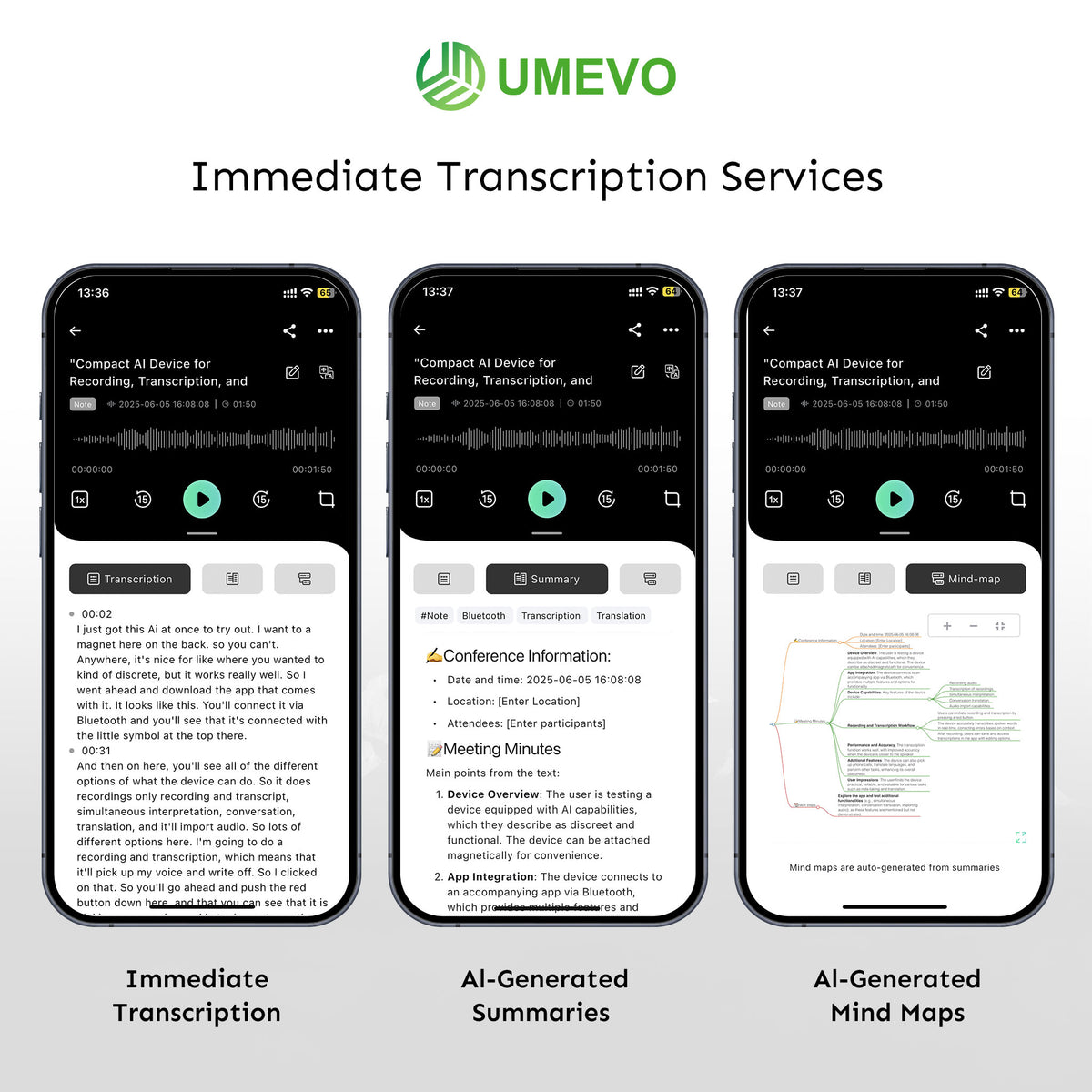
After the meeting, connect the recorder to AI DVR Link and locate the intended recording. UMEVO’s current app documentation describes device binding, file synchronization, transcription, summaries, speaker identification, naming speakers, translation, sharing, and Ask AI. Feature availability and plan terms can change, so use the live UMEVO App Guides for current steps.
- Confirm the file’s date, time, and duration before processing it.
- Select the source language that matches the meeting.
- Enable speaker identification when multiple people need to be distinguished.
- Start transcription and keep the original recording available.
- Rename the file with a consistent project and meeting convention.
Do not treat transcription as the final document. It is the searchable evidence layer from which the minutes will be built.

Step 4: review the transcript before summarizing
Review the transcript in order of consequence. Begin with the information that could create work, cost money, change scope, or affect a customer. Listen to the matching audio whenever the text is uncertain.
| Check | What to verify | Why it matters |
|---|---|---|
| Names and speakers | Participant names, speaker labels, companies, products, and roles. | A correct statement assigned to the wrong person can create false accountability. |
| Numbers | Prices, quantities, percentages, dates, times, versions, and project codes. | One digit can change a budget, deadline, or technical requirement. |
| Negation and conditions | Words such as “not,” “unless,” “only if,” and “after approval.” | A missing condition can reverse the meaning of a decision. |
| Decisions | Approved choice, rejected option, scope change, and unresolved issue. | Discussion should not be reported as a final decision. |
| Actions | Task, owner, deadline, dependency, and expected deliverable. | An action without ownership or timing is difficult to execute. |
For a repeatable audit method, see How to Check an AI Transcript. The useful principle is simple: review entities and commitments first, then improve wording.

Step 5: turn the verified transcript into meeting minutes
Once the high-impact details are correct, generate or edit the structured summary. Use one decision per bullet and one action per row. Remove repeated discussion while preserving conditions, objections that materially affect the decision, and unresolved questions.
AI can help extract possible decisions and tasks, but it cannot know whether a suggestion was formally accepted unless the conversation made that status clear. Use language that matches the evidence:
- Decided: the group reached a clear conclusion.
- Proposed: someone suggested an option that remains open.
- Assigned: a named person accepted a specific task.
- Pending: the outcome depends on approval, research, or another team.
Before sharing, compare the minutes with the meeting purpose. If the document cannot answer “What changed because of this meeting?”, it still contains too much transcript and too little operational meaning.
Step 6: use a five-minute human review
The five-minute target begins after a usable transcript and draft are available. It works best for a prepared, routine meeting with clear verbal decisions. Complex, disputed, regulated, technical, or multilingual meetings may require more time.
Extend the review when needed: never force a high-risk meeting into five minutes. The correct review length depends on the consequences of an error, audio quality, speaker overlap, terminology, and the number of commitments.
Reusable AI meeting-minutes template
| Section | What to write | Verification question |
|---|---|---|
| Meeting | Title, date, time, purpose, attendees, and relevant project. | Does this identify the correct conversation and source file? |
| Executive summary | Two or three sentences describing the outcome. | Does it reflect decisions rather than general discussion? |
| Decisions | One approved, rejected, postponed, or changed item per bullet. | Can each decision be traced to the transcript or audio? |
| Action items | Task, owner, due date, dependency, and deliverable. | Did the owner and timing actually appear in the meeting? |
| Risks and blockers | Missing information, approvals, conflicts, and external dependencies. | Could any condition change the reported decision? |
| Open questions | Unresolved issue, next step, owner, and review date. | Is this clearly separated from completed decisions? |
| References | Authorized link to recording, transcript, files, or prior decision. | Can reviewers find the evidence without exposing it broadly? |
Common problems and how to fix them
The transcript mixes up speakers
Rename speakers manually where the app allows it. Confirm each decision and action by listening around the relevant timestamp. In the next meeting, reduce overlap and ask participants to state names when accountability matters.
Names and technical terms are wrong
Correct recurring terms before generating the final minutes. Ask speakers to spell important names or codes during the meeting. Maintain a short project glossary for reviewers rather than assuming fluent-looking text is correct.
The summary invents an action item
Return to the transcript and source audio. If the team discussed an idea without assigning it, label it as a proposal or open question. Do not create an owner or deadline that was never agreed.
The room audio is difficult to understand
Move the recorder closer, remove noise sources, reduce table vibration, and avoid placing it behind a laptop or papers. For the current file, mark uncertain passages instead of guessing.
The minutes are still too long
Keep only decisions, actions, constraints, risks, and unresolved questions. Move background detail to an appendix or leave it in the transcript for reference.
Privacy, consent, and sharing
Before recording, obtain the notice or consent required for the location, organization, and type of conversation. A recording device does not make a meeting legally permissible, and this guide does not provide legal advice.
Decide who may access the source audio, transcript, generated summary, and final minutes. Review the current UMEVO privacy policy and your own retention rules. Sensitive meetings may require a vendor assessment, a shorter retention period, restricted sharing, or a different workflow.
When sharing, send the minimum necessary artifact to the intended audience. A broad summary may be appropriate for the team while the full recording remains limited to authorized reviewers.
When UMEVO Note Plus fits the workflow
- You record recurring in-person meetings, calls, interviews, or spoken notes.
- You want a physical control that can start capture without first opening a phone app.
- You need a connected path from source audio to transcript, structured summary, speaker labels, and exports.
- You will keep a human review step for important details.
- Your organization does not permit the required app or processing path.
- You need fully offline transcription and summarization.
- You require production audio for music, film, or broadcast.
- You only record occasional personal memos already handled well by your phone.
The current UMEVO Note Plus product page is the source for live device specifications, purchase terms, and plan wording. Use the UMEVO Note Plus user manual for setup, mode, synchronization, and export instructions.
Check current UMEVO Note Plus details
Meeting minutes with AI FAQ
Can AI create meeting minutes from an audio recording?
Yes. A common workflow is to transcribe the recording, identify speakers, create a structured draft, and review decisions and action items. Keep the source audio available because the transcript and summary can still contain errors.
Can meeting minutes really be completed in five minutes?
A prepared reviewer may be able to check a routine draft in about five minutes after the transcript is ready. It is not a universal guarantee. Complex, sensitive, disputed, technical, or poor-quality recordings should receive a longer review.
What is the difference between a transcript and meeting minutes?
A transcript records what was said in sequence. Meeting minutes compress the conversation into context, decisions, actions, owners, deadlines, risks, and open questions.
What should I verify before sharing AI-generated minutes?
Verify participant names, speaker labels, numbers, dates, negative statements, decisions, owners, deadlines, conditions, and access permissions. Listen to the matching audio for anything consequential or uncertain.
Can UMEVO Note Plus record in-person and phone meetings?
UMEVO documents NOTE mode for room recording and CALL mode for the documented phone setup. Select the correct mode, follow the placement instructions, run a short test, and obtain required permission.
Does UMEVO generate action items automatically?
The documented app workflow includes transcription and structured AI outputs. Treat extracted actions as draft suggestions until a person confirms that the task, owner, deadline, and conditions were actually agreed.
Should the full recording be shared with the minutes?
Only when recipients are authorized and need the source. Often the reviewed minutes can be shared more broadly while the recording and transcript remain limited under the organization’s privacy and retention rules.
Official UMEVO sources checked:
This update used the current product page, user manual, App Guides, and privacy policy. Product specifications remain manufacturer claims unless independently tested.





0 comments