

You might know it is easy to miss things in fast meetings, especially when your team works from different places. AI meeting recording can fix this problem for you. Right now, 85% of companies use or want to use these tools. By 2025, 80% will depend on AI to write down what is said in meetings. Why do they do this? You can save up to 30 minutes in each meeting, help your team work together better, and never forget important things.
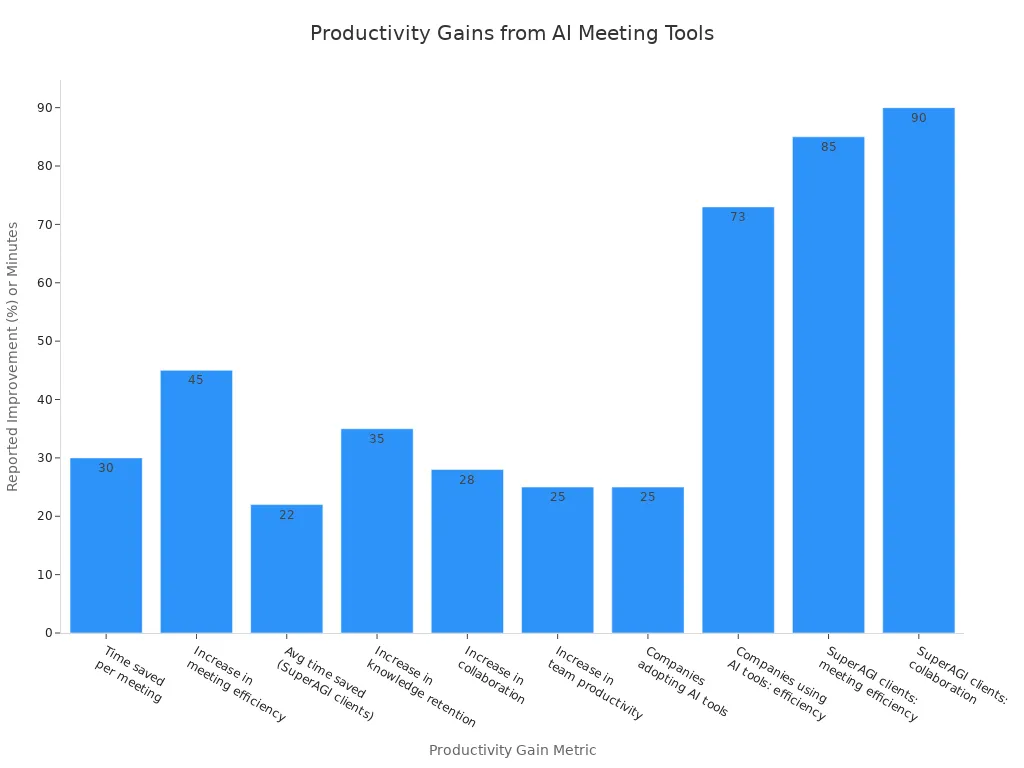
AI meeting recording lets you keep, sort, and look back at everything from client talks to team news. This means your team gets more done and feels less worried.
Key Takeaways
AI meeting recording tools help save time. They write notes for you. This lets your team pay attention to the talk.
These tools help teams work better together. They share live notes, summaries, and action items with everyone. It does not matter where people work.
The best AI tools keep your data safe. They support many languages. They also work with popular apps to fit your workflow.
Picking the right AI note taker depends on your team size. It also depends on your budget and the apps you use every day.
Using AI meeting assistants helps your team remember details. It helps reduce mistakes. Your team can do more work in less time.
Top AI Meeting Recording Tools
If you want your team to get more done, you need the best ai meeting assistants. These tools help you remember everything from meetings. They keep everyone updated and make meetings easier. Here are the top ai meeting recording choices for remote teams in 2025.
Fireflies.ai
Fireflies.ai is one of the best ai meeting assistants for remote teams. You can use it to record and write down meetings on almost any platform. It works with Zoom, Google Meet, and Microsoft Teams. Fireflies.ai gives you over 95% correct transcriptions and supports 69 languages. This makes it easy to work with teams around the world. There is a mobile app for recording and writing down meetings offline. This is not common in other ai note taker tools. The AI helper, Fred, works like ChatGPT and answers questions about old meetings. You can sort audio clips, save important parts, and share searchable and timed transcriptions with your team. Fireflies.ai also keeps your data safe with strong encryption and privacy settings.
Tip: Fireflies.ai is great if you want teamwork, strong safety, and connections with Notion, ClickUp, and monday.com.
Otter.ai
Otter.ai is liked by small and medium teams that want live meeting notes and easy teamwork. You get live writing during meetings, so everyone can follow and add comments or changes. Otter.ai works well even with noise or weak internet. It fits into your work with Zoom, Google Meet, and Dropbox. Otter.ai is also used in schools and research, making it a top ai note taker for many jobs.
Use Otter.ai if you want to take notes automatically, share meeting recordings fast, and keep your team working together.
UME AI Voice Recorder
UME AI Voice Recorder is new but is quickly becoming a top ai meeting transcription tool. You can use it to record and write down meetings in many languages. This is good for teams in different countries. The tool gives real-time writing and lets you mark key points as you talk. UME AI Voice Recorder also connects with popular platforms, so you can save and share notes easily. If you want a simple and steady ai note taker, try this tool.
MeetGeek
MeetGeek makes recording and writing down meetings simple for everyone. It joins your meetings by itself and sends you AI-made notes, highlights, and action items after the call. MeetGeek works with Microsoft Teams, Zoom, Google Meet, Slack, Notion, and more. You can sync meeting recordings and notes with project and CRM tools like Trello, HubSpot, and Salesforce. MeetGeek also gives you reports to track meeting patterns and help you get more done.
Platform |
Integration Features |
|---|---|
Zoom, Teams, Google Meet |
Auto-join, recording, transcription, AI notes |
Slack, Notion, Monday |
Sync notes, highlights, and recordings |
HubSpot, Salesforce |
Sync transcripts and tasks |
Trello, ClickUp, Jira |
Create tasks from meeting highlights |
Avoma
Avoma is one of the best ai meeting assistants for teams that want to work together on notes. It writes down meetings as they happen and lets everyone add comments or notes inside Zoom. After the meeting, you can check the recording, writing, and AI-made summary. Avoma tracks action items and gives ideas for follow-up, so nothing is missed. The tool also looks at talks to find key moments and ideas, making it a top ai note taker for sales and customer teams.
Pick Avoma if you want shared meeting ideas, live teamwork, and automatic action item tracking.
tl;dv
tl;dv helps you focus on what matters by giving you live highlights and summaries after meetings. It does not give full live writing, but it does turn speech into text and shows who spoke after the meeting. tl;dv pulls out action items and connects with project tools, so you can follow up quickly. This tool is great for UX and product teams who want to save time and get to the main points.
Feature |
tl;dv Capability |
|---|---|
Not available (transcript after meeting ends) |
|
Real-time highlights |
Available |
Post-meeting summary |
Available |
Speaker identification |
Supported |
Action item extraction |
Automated |
Notta AI
Notta AI is one of the best ai note taker tools for teams that need strong safety and many languages. You get live writing in over 58 languages, plus role-based access and co-editing for easy teamwork. Notta AI keeps your meeting data safe with ISO 27001 and SOC 2 Type II certificates, strong encryption, and follows privacy laws like GDPR and HIPAA. You can set detailed permissions, use two-factor login, and even hide private details. Notta AI works with Zoom, Google Meet, and more, making it smart for teams with secret info.
Notta AI is great if you want safe, team note-taking and need to work with teams around the world.
meeting.ai
meeting.ai makes it easy to record and write down meetings, pull out action items, and sum up talks. The tool uses ai to check feelings, so you can see how people feel during calls. You can connect meeting.ai with Salesforce, Slack, Google Calendar, Asana, Trello, and Jira, so your meeting results fit into your work. This ai meeting assistant helps teams in different places stay on track and work together, no matter where they are.
If you want easy workflow connections and automatic action item tracking, meeting.ai is a good choice.
Fathom
Fathom is one of the best free ai meeting assistants. You get unlimited meeting recordings, writing, and summaries, even for free. Fathom supports 28 languages and works with Slack, HubSpot, Salesforce, and Google Docs. The tool makes AI action items, follow-up emails, and meeting summaries you can change. Fathom is quick, giving you a summary in 30 seconds after your call. It’s a top pick for freelancers, sales teams, and anyone who wants unlimited ai note taker features for free.
Fathom is great if you want free writing, fast summaries, and strong CRM connections.
Krisp
Krisp is different from other ai note taker tools because it focuses on sound quality. Its AI-powered noise blocking stops background sounds, so your meeting recordings are always clear. This helps the ai meeting transcription tool catch every word right. Krisp works in the background, recording and writing down meetings without bots. You get automatic meeting notes and summaries, plus connections with calendar and CRM tools. Krisp has a free plan with daily noise blocking and meeting summaries, so it is easy to try.
Use Krisp if you want clear sound, better writing, and meetings with no distractions.
Note: The best ai meeting assistants all have special features, from live writing and many languages to strong safety and easy connections. Try a few to see which ai note taker works best for your team.
Why AI Meeting Recording Matters
Productivity
You want your team to finish more work in less time. AI meeting recording tools help with this. These tools let you skip writing notes by hand. You can pay attention to the talk instead. AI note taker features record every word and action item for you. You will not miss anything important. Look at this table to see how much more work you can do:
Source |
Key Findings |
Productivity Impact |
|---|---|---|
Salesforce Report |
AI transcription tools boost productivity and accuracy |
|
DigitalOcean Case |
71% of companies saw gains with ai note taker tools |
Fewer errors, more output |
SuperAGI Case Study |
Less time on notes, more teamwork |
40% less note-taking time |
AI meeting assistants help you save time and make fewer mistakes. Your team can keep moving forward. Tools like tl;dv and Avoma give you meeting scorecards and searchable notes. You spend less time looking for things and more time working.
Collaboration
Working with a remote team can be hard. You may worry that people miss important points or tasks. AI meeting recording tools help by giving you real-time transcription and meeting summaries. You can share these right away. Everyone gets the same information, no matter where they are. AI note taker features let you comment, highlight, and follow up on tasks together. Automated notes help everyone stay on track. With AI, teamwork gets better and there are fewer mix-ups. Meetings become a place for sharing ideas, not just updates.
Documentation
It is hard to remember everything from meetings, especially with many speakers and changes. AI meeting recording tools make it easy to keep records. You get accurate transcription, meeting summaries, and clear action items. AI note taker tools let you edit and share notes right away. You can search old meetings for details you missed. This stops you from losing information and keeps projects moving. Summaries and tool connections mean you never lose track of tasks or choices.
Tip: Use AI meeting assistants to turn messy meetings into neat, searchable records. You will always know what happened and what to do next.
Key Features in AI Meeting Transcription Tools
Transcription Accuracy
You want your notes to be correct every time. That is why transcription accuracy is important in any ai meeting transcription tool. Most top tools are about 85% to 90% accurate. This can change if there are many speakers or special words. Here is a table that shows how some tools compare:
Tool |
Single-Speaker Accuracy |
Multiple-Speaker Accuracy |
Technical Terminology Accuracy |
Accent Accuracy |
|---|---|---|---|---|
Tactiq |
95% |
90% |
85% |
N/A |
Krisp AI |
90% |
92% |
N/A |
80% |
Otter.ai |
90% |
85% |
80% |
N/A |
Fireflies.ai |
90% |
85% |
N/A |
75% |
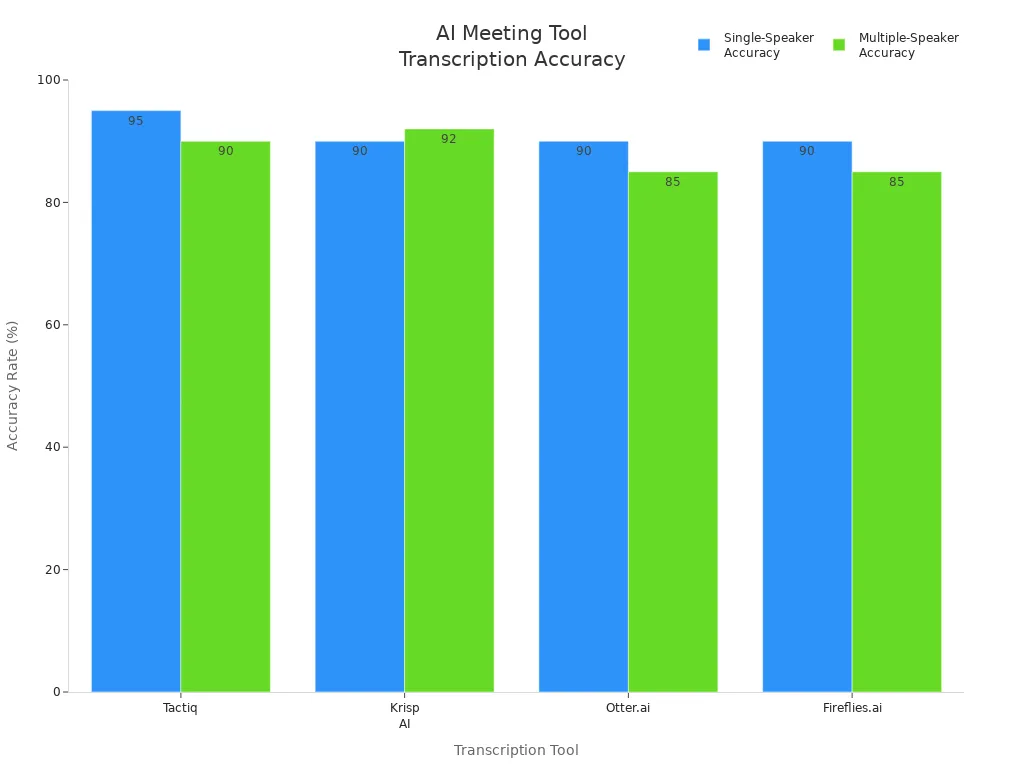
Some tools work better with one speaker. Others do well with accents or special words. If you want the best accuracy, check which tool matches your team’s needs.
Experts say ai meeting transcription tools are now needed for teams. They help you work faster and keep your notes clear.
Integrations
You likely use more than one app for work. The best ai meeting transcription tool connects with your favorite project and CRM tools. This helps you turn meeting notes into tasks or updates easily. For example:
Fireflies.ai links with over 9 project tools and can make tasks after meetings.
It also connects with CRMs and other teamwork tools, so your work stays smooth.
Sembly Notes works with project and task software, makes project plans, and tracks choices from meetings.
When your tools work together, you save time and make fewer mistakes.
Security
Keeping your meeting data safe is very important. Top ai meeting transcription tools follow strict rules to protect your info. Here is what you should look for:
Uses encryption when recording and storing
Has role-based access controls
Gives clear privacy rules and data rights
Lets you pick secure cloud or on-site storage
Does regular security checks and audits
Tells meeting people about ai use
Always pick tools that keep your team’s info private and safe.
Ease of Use
You want a tool that is simple to use. Many people like tools like Jamie because you do not need to invite a bot. You get live transcription and summaries right away, even for free. You do not have to upload files or wait for notes. Otter.ai and Fireflies let you work together easily, but some people do not like bots joining meetings. Krisp.ai blocks noise and gives clear notes, but some users say it is hard to find old recordings. The best tools focus on privacy, real-time transcription, and easy access.
Tip: Pick a tool that fits your work style and is easy to use. You will spend less time learning and more time working.
Best AI Meeting Assistants Compared
Comparison Table
It can be tough to choose the right ai meeting assistants for your team. Each tool has different features and prices. This table helps you see what each one offers. You can look at the cost, what you get, and what makes each tool special.
Tool |
Free Plan |
Starting Price (per user/month) |
Key Features in Paid Plan |
Unique Selling Points |
|---|---|---|---|---|
Otter.ai |
Yes |
$8 |
Real-time transcription, collaboration |
Accurate, affordable, strong teamwork |
Fireflies.ai |
Yes |
$6 |
CRM integration, keyword search |
Easy search, connects with many tools |
Avoma |
Yes |
$15 |
Pre-meeting prep, AI summaries, CRM integration |
Full meeting workflow, smart CRM sync |
Fathom AI |
Free |
$12 |
Highlighting, detailed summaries |
Free plan, fast meeting summaries |
Zoom AI Companion |
No |
$15 |
Meeting insights, action tracking |
Built into Zoom, easy for Zoom users |
Notion AI |
No |
$10 |
Summaries, customizable note templates |
Flexible notes, works with Notion workspace |
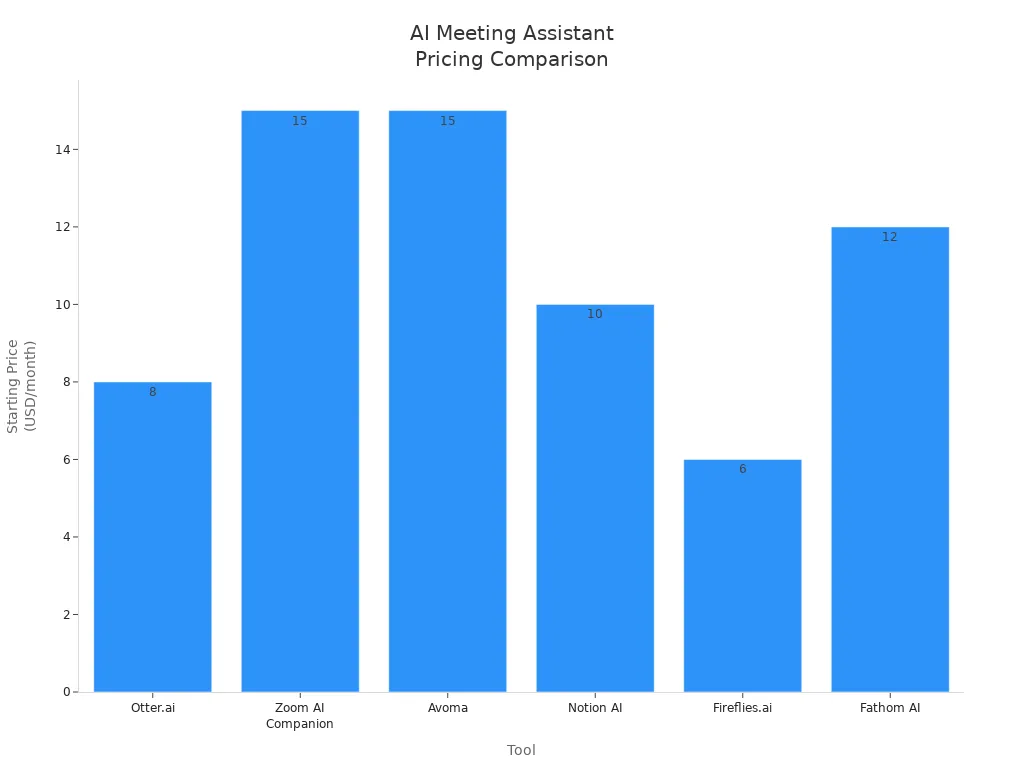
Some ai meeting assistants have free plans. Others start at a low monthly price. Otter.ai and Fireflies.ai give you good transcription and summaries for less money. Avoma is best if you want help before, during, and after meetings.
Use Cases
You may ask how these tools help in real meetings. Here are some ways ai meeting assistants make work easier:
They set up meetings and reminders, so you do not forget.
They record and write down meetings as you talk.
They make summaries and action lists, so follow-up is simple.
They make voices clearer, even if there is noise.
They let you tag and sort notes, so you can find them later.
They support many languages, so teams from anywhere can use them.
They connect with tools like Notion or Asana to sync tasks.
Tip: Let an ai meeting assistant take notes and remind you about tasks. You will have more time for important work and less for small jobs.
Many teams use these tools to track tasks and keep everyone updated. You get clear meeting summaries and can search old meetings for details. The best ai meeting assistants help you have better meetings and get more done.
How to Choose an AI Note Taker
Team Size
When you pick an ai note taker, think about your team size first. A small team may need only basic features, while a large team needs more options. Here are some things you should check:
Look for pricing plans that fit your team and can grow as your team grows.
Make sure the ai note taker tools have features like real-time transcription and action item tracking.
Check if the tool works with your current apps, like your CRM or project manager.
Choose a user-friendly tool so your team can start using it fast.
Always check for strong security and data protection.
Try free versions or trials before you buy.
You can also involve your team in the decision. Ask them what they need from the best ai note taker tools. This helps everyone feel included and makes adoption easier.
Workflow
Your workflow matters a lot when choosing the best ai note taker tools. The right tool should fit into your daily routine without causing problems. If your ai note taker connects with your calendar and video meeting apps, it can join meetings, record, and transcribe everything for you. This saves time and keeps your meetings smooth.
Many ai note taker tools send notes to Slack, Trello, or Asana. They can even create action items and reminders. This means you spend less time on manual tasks and more time working together. When your ai note taker fits your workflow, you get better meeting records and your team stays on track.
Tip: Pick an ai note taker that supports your favorite apps and helps your team work better together.
Budget
You want the best value for your money. The price of ai note taker tools can vary a lot. Some offer free plans for individuals, while others have business plans for teams. Here’s a quick look at what you might pay:
AI Note Taker |
Plan Type |
Price (per user/month) |
Target User Size |
Key Features / Notes |
|---|---|---|---|---|
Fathom |
Free |
$0 |
Individuals / Small Teams |
Unlimited recordings, limited AI summaries |
Fathom |
Team Edition |
$19 |
Small Teams |
Collaboration features (folders, comments, alerts) |
Fireflies |
Free |
$0 |
Individuals |
Unlimited transcription, basic summaries |
Fireflies |
Business |
$19 |
Small to Medium Teams |
Video recording, conversation intelligence |
Avoma |
AI Meeting Asst |
$19 |
Small Teams |
Recording, transcription, AI notes |
Avoma |
Enterprise |
$39 |
Large Teams |
Dedicated support, business reviews |
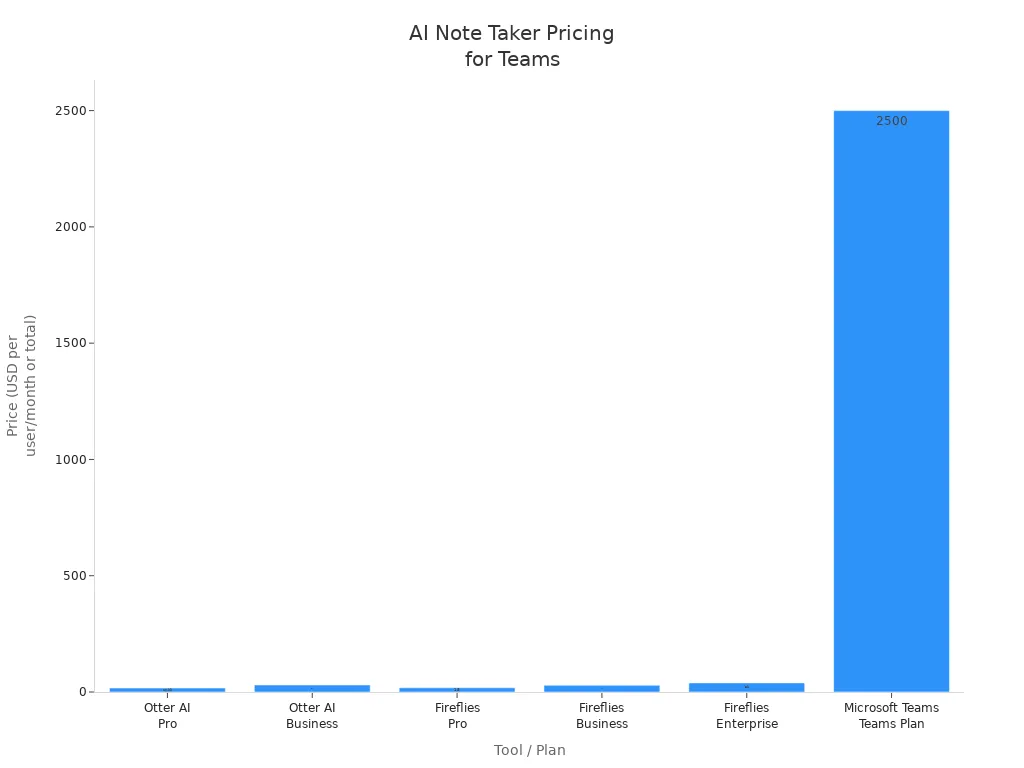
Think about your team’s needs and budget before you choose. Free plans work for small teams or testing. Paid plans give you more features and support as your team grows. The best ai note taker tools help you save time and money by making meetings easier.
Remember, the best ai meeting assistants are the ones that fit your team, your workflow, and your budget.
The right ai note taker helps your team get more done. It keeps everyone focused and makes meetings simple to handle. Many remote teams say they remember more and have fewer mix-ups. They also follow up faster because of the best ai note taker tools. If you choose an ai note taker that matches your work style and keeps things safe, you get clear meeting notes and can search old records. Try a few top ai note taker tools to find which one makes meetings easier and helps your team stay close.
FAQ
What is an AI meeting recording tool?
An AI meeting recording tool listens to your meetings and writes down what everyone says. You get notes, summaries, and action items. You can search old meetings and never miss anything important.
Are AI meeting notes safe?
Most top tools use strong encryption and follow privacy rules like GDPR. You control who sees your notes. Always check the tool’s privacy settings before you start.
Can I use these tools with Zoom or Google Meet?
Yes! Many AI meeting assistants work with Zoom, Google Meet, and Microsoft Teams. You just connect your account, and the tool joins your meetings to record and take notes for you.
Do I need to install anything?
Some tools work right in your browser. Others may need a small app or browser extension. You can usually start in just a few minutes. Check the tool’s website for setup steps.


0 comments