

Quick answer: The best PLAUD alternative depends on whether you need a recorder, a wearable personal AI, or the lowest ongoing transcription cost. UMEVO Note Plus is the closest value-focused alternative for phone calls and in-person meetings. Bee Pioneer is the inexpensive wearable option for ambient summaries, but it does not preserve audio recordings and its Android app remains limited. K&F Concept GW63.0004 adds a display and power-bank function, although availability and AI-service terms vary by regional listing. PLAUD Note Pro remains the premium baseline for a mature recording and note-management ecosystem.
This comparison uses current manufacturer specifications and plan pages. It is not a laboratory audio test, and we have removed unsupported claims about noise floors, failure rates, transcription accuracy, and competing brands that appeared in the previous version.
Updated July 16, 2026. Prices, stock, transcription allowances, app support, and regional availability can change. Verify the live product and plan pages before purchasing.
Jump to: comparison table | UMEVO vs. PLAUD | Bee vs. PLAUD | K&F vs. PLAUD | subscription costs | FAQ
PLAUD Alternatives Compared: UMEVO, Bee, and K&F Concept
The table compares manufacturer-published information available on July 16, 2026. Prices shown are the listed prices we found in the manufacturers' US or UK stores, not permanent offers.
| Device | Best For | Published Recording / Battery | Storage and Audio | Included AI Service | Current Listed Price |
|---|---|---|---|---|---|
| PLAUD Note Pro | Premium phone-call and meeting capture | Up to 30 hours in Enhance mode or 50 hours in Endurance mode | 64GB; stores recordings | 300 transcription minutes per month on Starter; 112 languages | $189 |
| UMEVO Note Plus | Value-focused phone calls, meetings, interviews, and lectures | About 40 hours recording; up to 60 days standby | 64GB; MP3 recording | Unlimited transcription in year one; 400 minutes/month on Starter from year two; 140+ languages | $149 sale price |
| Bee Pioneer | Wearable ambient summaries and personal recall | Up to 7 days / 160+ hours battery | Does not save or store audio recordings | Processes up to 40 languages; future Premium plan announced | $49.99; US shipping only |
| K&F Concept GW63.0004 | Display, magnetic recording, and phone power-bank function | 60 hours claimed for the 3000mAh model | 64GB plus claimed cloud capacity; stores recordings | 107-language transcription/translation on this UK listing; plan details are inconsistent | £99.99; UK listing was out of stock |
Important: Bee Pioneer is not a like-for-like replacement for PLAUD Note Pro. PLAUD, UMEVO, and the K&F model are dedicated recorders that retain audio. Bee is an ambient personal AI that says it processes conversations in real time and deletes the raw audio rather than saving it.
How These PLAUD Alternatives Actually Differ
Products described as "AI note takers" now fall into several categories. Comparing battery hours without separating these categories can lead to the wrong purchase.
- Magnetic card recorder: attaches to a phone for call capture and can also record an in-person conversation. PLAUD Note Pro and UMEVO Note Plus fit this category.
- Recorder with extra hardware functions: K&F Concept GW63.0004 combines recording with a display and phone-charging battery.
- Ambient wearable: Bee Pioneer is worn on a wrist or clip and builds summaries and personal context throughout the day. It is not designed as an audio archive.
- Software meeting bot: services such as Otter, Fireflies, and tl;dv join or capture online meetings without requiring a pocket recorder. They solve a different problem from phone-call hardware.
Start by deciding whether you must keep the original audio. If the answer is yes, Bee should not be your primary recorder. If you only want summaries and reminders from daily conversations, local storage may be less important than wearability and personal context.
UMEVO Note Plus vs. PLAUD Note Pro
UMEVO Note Plus is the most direct alternative in this comparison because both devices are slim magnetic recorders with dedicated modes for phone calls and in-person conversations. Both publish 64GB storage and a 30-gram body.

Where UMEVO has the value advantage
The current UMEVO product page lists Note Plus at $149 and includes an unlimited Max transcription plan during the first year. From year two, the Starter plan includes 400 minutes per month, with paid Pro and Max options for heavier use. UMEVO publishes support for more than 140 transcription and translation languages, about 40 hours of recording, and up to 60 days of standby.
This makes UMEVO easier to budget for users who expect to transcribe many hours during the first year. It is also the better fit in this group when broad language coverage is a priority, subject to checking the exact language and regional dialect on UMEVO's supported-language page.
Where PLAUD Note Pro has the hardware and ecosystem advantage
PLAUD Note Pro publishes four MEMS microphones plus one voice pickup unit, an AMOLED status display, smart switching between call and in-person modes, and a five-meter pickup range in Enhance mode. Its Endurance mode extends the published continuous recording time to 50 hours with a shorter three-meter pickup range. The Starter plan includes 300 transcription minutes per month.
Choose PLAUD Note Pro when the larger-room microphone system, device display, PLAUD Desktop, and PLAUD's broader note-management ecosystem matter more than the lower purchase price or larger included first-year transcription allowance.
What PLAUD Note Pro Sets as the Baseline
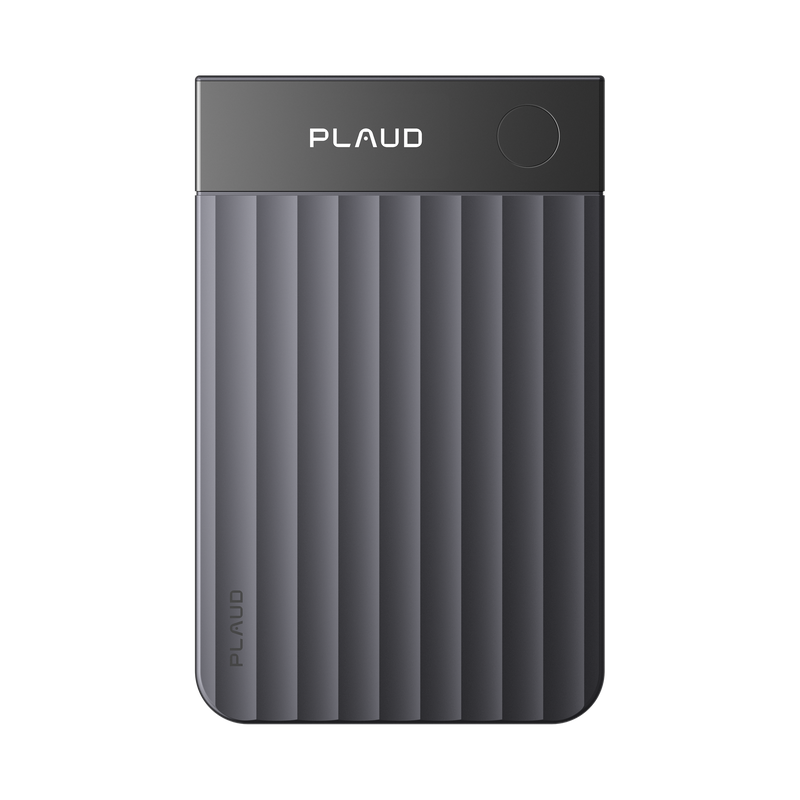
A useful PLAUD alternative should beat PLAUD on a dimension you care about rather than simply cost less. PLAUD Note Pro currently provides:
- 64GB local storage and a 30-gram card body.
- Phone-call and in-person recording with automatic mode switching.
- Up to 30 hours recording in Enhance mode or 50 hours in Endurance mode.
- Transcription in 112 languages with speaker labels and custom vocabulary.
- 300 transcription minutes each month on the free Starter plan.
- Mobile, web, and desktop workflows, plus paid Pro and Unlimited plans.
PLAUD is therefore the stronger choice when you prefer its app and ecosystem, even if another device offers more included transcription or a lower hardware price. A substitute is only better when its tradeoff matches your workflow.
Bee Pioneer vs. PLAUD: Wearable AI or Audio Recorder?
GSC data shows strong interest in "Bee vs. PLAUD," but the products are not direct equivalents. Bee Pioneer is a $49.99 wearable personal AI with a wristband and clip, dual microphones, a physical action button, and a published battery life of up to seven days. It supports up to 40 languages.

Choose Bee Pioneer when
- You want a wearable that can summarize conversations and identify patterns across your day.
- You value long battery life, a wristband or clip, and a low hardware price.
- You do not need to keep, replay, or export the original audio recording.
- You are in the United States and primarily use the supported Bee experience.
Choose PLAUD or UMEVO when
- You need a preserved audio file for review, editing, evidence, or quality control.
- You need a dedicated phone-call recording mode.
- You want a magnetic card device rather than an ambient wearable.
- You use Android and require a fully supported workflow now.
Bee's official FAQ says raw audio is processed in real time and immediately deleted rather than stored. It also says the Android app is an early-access build with limited core features and is not actively supported at present. This is a clearer limitation than the previous article's unsupported claim that Bee suffered widespread Android connection failures.
Bee currently ships only within the United States. The company says a future Premium subscription will unlock advanced features, but details have not yet been published. Treat today's service terms as changeable.
K&F Concept vs. PLAUD: Check the Exact Model
K&F Concept sells several voice recorders under similar product names, so the SKU matters. This comparison uses the UK GW63.0004 listing, not every Kentfaith or K&F recorder.
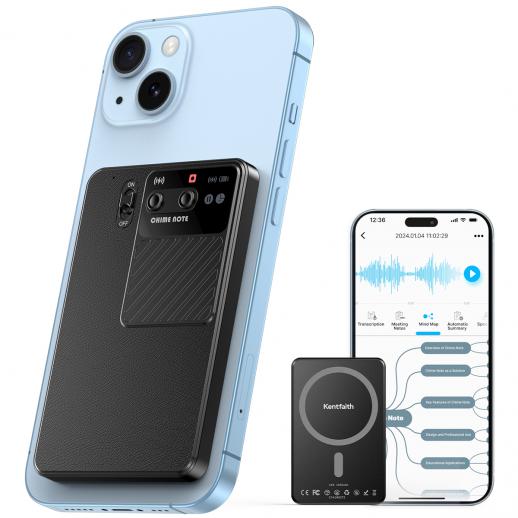
The official listing publishes a 3000mAh battery, 60 hours of continuous recording, 64GB storage, 107-language transcription and translation, a small OLED display, magnetic phone attachment, and a power-bank function. The UK page listed a £99.99 sale price but was out of stock when this article was updated.
K&F's larger battery and status display distinguish it from the thinner 30-gram cards. The tradeoff is that it is physically a different class of product, and regional K&F stores list multiple AI recorder variants with different apps, language counts, battery specifications, and service descriptions.
Do not buy from a comparison table alone. Confirm the SKU, dimensions, weight, app name, phone compatibility, included transcription allowance, renewal price, and local return policy on the exact store page. The UK product page describes free transcription, while its customer reviews and other K&F FAQs refer to subscriptions or additional paid minutes. Because those statements conflict, we cannot verify it as a permanently subscription-free PLAUD alternative.
Is There a PLAUD Alternative Without a Subscription?
There is no reliable basis for calling every AI feature on these products permanently subscription-free. Hardware recording and cloud transcription are separate services:
- PLAUD Note Pro: includes 300 transcription minutes per month on Starter. Paid plans add minutes and advanced features.
- UMEVO Note Plus: includes unlimited transcription in the first year, then 400 minutes per month on Starter from year two. Paid plans or minute packs are optional for heavier use.
- Bee Pioneer: currently describes its core service and says a future Premium subscription will add advanced features. It does not save raw recordings.
- K&F Concept: official regional pages and reviews provide inconsistent statements about free transcription and subscriptions. Verify the current app terms before purchase.
If avoiding recurring fees is the main goal, estimate your monthly transcription hours before buying. A free allowance can be enough for occasional meetings, while a generous first-year plan may be less expensive for heavy initial use. For complete control, choose hardware that lets you export the audio and run a separate local transcription workflow, but confirm the export format and whether the app permits direct file access.
Android and iPhone Compatibility
Magnetic attachment and app compatibility are different questions. iPhones with MagSafe can attach directly to a compatible case or recorder. Many Android phones require the included or separately purchased magnetic ring, even when the app itself supports Android.
| Device | iPhone | Android | What to Confirm |
|---|---|---|---|
| PLAUD Note Pro | Supported | Supported; magnetic ring may be needed | App OS requirement and magnetic attachment |
| UMEVO Note Plus | Supported | Supported; magnetic ring may be needed | AI DVR Link app availability and phone attachment |
| Bee Pioneer | Primary supported experience | Early access with limited features; not actively supported | Current Android support before ordering |
| K&F GW63.0004 | MagSafe attachment and charging described | Extra magnetic ring may be required | Exact SKU, app, charging, and attachment support |
Android buyers should download the required app and review its latest store listing before the return window closes. Hardware specifications do not prove that every AI feature is identical on iOS and Android.
Phone-Call Recording vs. Ambient Capture
PLAUD Note Pro and UMEVO Note Plus use dedicated call and in-person recording modes. For a phone call, the device attaches to the phone so its voice pickup or vibration-conduction system can capture the remote side. The exact result still depends on the phone, case, attachment, call volume, and environment.
K&F's GW63.0004 listing also advertises magnetic call recording. Bee Pioneer is designed around nearby conversations and personal context, not magnetic phone-call capture. Do not choose Bee as a phone-call recorder simply because it has microphones.
No manufacturer specification guarantees a flawless transcript. Keep the original audio when accuracy matters, test the recorder before an important session, and review names, numbers, speaker labels, and technical terms. Also obtain any consent required by applicable recording laws and organizational policy.
Transcription Plans and Data Handling
AI recorder costs include more than the hardware price. Review these items:
- Included monthly minutes: determine whether unused minutes roll over and what counts as a minute.
- Advanced-feature access: summaries, templates, translation, speaker labels, and model selection may depend on the plan.
- Audio ownership and export: confirm whether you can download the original recording and transcript in useful formats.
- Cloud retention: check where recordings and transcripts are stored and how deletion works.
- Service continuity: AI features depend on the manufacturer's app and cloud service even when audio remains on the device.
Bee's model is materially different: its official FAQ says raw audio is processed in real time and immediately deleted, while summaries and personal context remain available to the user. PLAUD, UMEVO, and K&F are recording products, so examine their current privacy notices and account settings for cloud processing, retention, export, and deletion.
How to Choose a PLAUD Alternative
- Define the source: phone calls, in-person meetings, online meetings, lectures, or all-day ambient conversations.
- Decide whether raw audio is required: this immediately separates dedicated recorders from Bee Pioneer.
- Estimate transcription use: multiply typical meeting hours by the number of meetings per month.
- Check your phone: verify app support, Android or iOS requirements, Bluetooth permissions, and magnetic attachment.
- Compare total first-year and second-year cost: include hardware, transcription plans, minute packs, accessories, tax, and shipping.
- Confirm language support: verify the exact language or dialect, not only the advertised total.
- Test the export workflow: make sure recordings, transcripts, and summaries can reach the tools you actually use.
- Review consent and privacy: understand when the microphone is active and how other people are notified.
For a broader device comparison that includes additional form factors, see our best AI voice recorder guide. For wearable-first options, compare our best AI wearables for 2026.
PLAUD Alternatives FAQ
What is the best alternative to PLAUD Note Pro?
UMEVO Note Plus is the closest alternative in this comparison for users who need both phone-call and in-person recording. It costs less at the current listed price and includes unlimited transcription during the first year. PLAUD Note Pro remains stronger when its display, larger-room pickup modes, and established software ecosystem are the priority.
Is Bee Pioneer better than PLAUD?
Bee is better for low-cost, wearable ambient summaries and personal context. PLAUD is better when you need to preserve, replay, and export original recordings or capture phone calls. They solve different problems.
Does UMEVO Note Plus require a subscription?
The current offer includes unlimited transcription in the first year. Beginning in year two, the Starter plan includes 400 minutes per month. Users who need more can buy minute packs or upgrade, while recording hardware remains usable according to the product's current terms.
Is K&F Concept a subscription-free PLAUD alternative?
We could not verify that claim. The GW63.0004 sales page describes free transcription, while K&F reviews and FAQs mention subscriptions or paid additional minutes. Confirm the current terms inside the exact companion app before purchasing.
Which PLAUD alternative is best for Android?
UMEVO Note Plus is the clearest Android-focused option among these alternatives because its product page explicitly lists Android support. PLAUD also supports Android. Bee's Android app is currently early access and not actively supported, while K&F compatibility depends on the exact model, app, and magnetic attachment.
Can these devices record phone calls?
PLAUD Note Pro, UMEVO Note Plus, and K&F Concept GW63.0004 advertise phone-call recording modes. Bee Pioneer is an ambient wearable and should not be treated as a magnetic phone-call recorder. Always test your phone and follow applicable consent rules.
Which option has the lowest ongoing transcription cost?
That depends on usage and time horizon. UMEVO offers the largest included first-year allowance in this comparison, then 400 minutes per month on Starter. PLAUD includes 300 minutes per month. Bee's product model is different and a future Premium plan has been announced. K&F's current terms are not clear enough to rank reliably.
Bottom Line
Choose UMEVO Note Plus when you want the closest lower-cost alternative to PLAUD for phone calls and meetings, broad language support, and generous first-year transcription. Choose Bee Pioneer when you want a low-cost wearable personal AI and do not need saved audio. Consider K&F Concept GW63.0004 when its display and power-bank design matter, but verify stock, SKU, app, and subscription terms carefully.
Choose PLAUD Note Pro when its microphone system, display, automatic recording modes, and software ecosystem justify the premium. The best PLAUD alternative is not the device with the longest specification list; it is the one whose recording model, app support, and ongoing service cost match the way you actually work.





0 comments