
Quick answer: there is no single best AI voice assistant for everyone in 2026. Gemini is the most natural starting point for many Android and Google-service users, Siri fits people who want voice control across Apple devices, Alexa+ is designed around compatible smart-home devices and household tasks, ChatGPT Voice is strongest for open-ended conversation, and Bixby remains useful for direct control of Samsung Galaxy features. Availability, supported languages, account requirements, and paid features can vary by device and region, so check the linked official pages before choosing.
This guide compares publicly documented capabilities rather than presenting a laboratory benchmark. Product features change quickly, and a feature that works on one phone, language, or account may not be available on another. The practical question is therefore not “Which assistant wins every test?” but “Which assistant can complete the tasks I actually need on the devices I already use?”
AI voice assistant comparison for 2026
| Assistant | Best fit | Where it works | Important limitation |
|---|---|---|---|
| Gemini | Android users and people who rely on Google services | Gemini mobile and web experiences; device integration depends on eligibility | Features differ by country, language, device, and account |
| Siri | Apple device actions, communication, reminders, and hands-free requests | Built into supported Apple devices | Some features and activation phrases vary by model, language, and region |
| Alexa+ | Compatible smart homes and shared household routines | Alexa-enabled devices, Alexa.com, and the Alexa app in supported markets | Current official availability and plan terms are region-specific |
| ChatGPT Voice | Back-and-forth explanations, brainstorming, and spoken questions | Supported ChatGPT mobile apps and web | It can make mistakes and is not a replacement for device controls or professional advice |
| Bixby | Samsung Galaxy controls and multi-step Quick Commands | Supported Samsung phones, tablets, watches, TVs, and connected services | Its main advantage is strongest inside the Samsung ecosystem |
Fast recommendation: begin with the assistant built around your existing ecosystem. Add a conversational assistant only when you need longer explanations or idea development. If your priority is capturing meetings, calls, interviews, or lectures for later transcription, use a dedicated recording workflow rather than assuming a voice assistant is recording a complete, reviewable source.
What counts as an AI voice assistant?
The phrase “AI voice assistant” now covers several different products. A device assistant can open apps, change settings, send messages, set timers, or control smart-home equipment. A conversational assistant focuses on spoken questions and longer responses. A business support platform may automate customer-service work but is not necessarily a personal voice assistant. A voice recorder captures audio for later playback, transcription, or summarization.
Mixing these categories leads to misleading comparisons. Jasper and Zendesk, for example, may use AI in business workflows, but comparing them directly with Siri or Bixby as if they perform the same job does not help a consumer choose a voice assistant. This article therefore focuses on assistants that accept spoken interaction and are directly usable by an individual.
- Choose a device assistant when you want hands-free control, calls, messages, reminders, navigation, or smart-home routines.
- Choose a conversational assistant when you want to discuss a topic, develop an idea, practice a language, or ask follow-up questions.
- Choose a dedicated recorder when the audio itself is the source you need to preserve, review, transcribe, or share.
Best AI voice assistants by use case
Gemini: a practical choice for Android and Google-service users
Google has been moving its mobile assistant experience from the classic Google Assistant toward Gemini. Google describes Gemini as a personal AI-powered assistant and positions Gemini Live for more natural, multimodal conversations. That transition is the main reason a 2026 comparison should no longer treat the classic Google Assistant as the default current choice on most modern Android phones.
Gemini is a sensible first option if you use Android and want one place for spoken questions, help across compatible Google services, and conversational assistance. Do not assume every advertised capability is available everywhere. Google maintains separate eligibility and availability information for its web and mobile apps, and access can vary by language, country, device, workspace policy, and subscription.
Official references: Google’s Assistant-to-Gemini transition and Gemini availability information.
Siri: the straightforward option for Apple device actions
Siri is built into supported Apple devices and is designed for everyday actions such as calling, messaging, timers, reminders, information requests, and hands-free interaction. On iPhone, activation can use a voice phrase or the side button, while available options depend on the model, language, region, and software configuration.
Siri is usually the easiest choice when your main goal is controlling an iPhone or other Apple device without switching to a separate app. It is a weaker basis for a universal “best assistant” claim because its value depends heavily on the Apple ecosystem and on which Apple Intelligence features your hardware and region support.
Official references: Apple’s Siri setup and activation guide and Siri, Dictation & Privacy.
Alexa+: a smart-home and household assistant
Alexa+ is Amazon’s generative-AI update to Alexa. Amazon presents it as a conversational assistant for smart-home control, household organization, shopping, music, reservations, and personalized help across compatible Alexa devices, the Alexa app, and Alexa.com.
Alexa+ is most relevant when an Alexa-compatible home is already the center of your setup. Current official information says broad access is available in the United States, while features and plan terms can differ elsewhere. Check Amazon’s current page before buying hardware or subscribing, especially if you live outside the United States.
Official reference: Amazon’s current Alexa+ availability page.
ChatGPT Voice: best suited to open-ended conversation
ChatGPT Voice supports spoken, back-and-forth conversations in supported mobile apps and on the web. It is useful when the task is to explain a concept, explore alternatives, rehearse a presentation, brainstorm, or continue asking follow-up questions without typing.
It should not be evaluated as if it were simply another smart-speaker controller. Its main role is conversation and reasoning support, not universal control of phone settings or home devices. OpenAI also warns that voice responses can contain mistakes. Important facts should be checked, and users should review the product’s data controls and current plan limits.
Official reference: OpenAI’s ChatGPT Voice guide.
Bixby: useful for direct Samsung Galaxy control
Bixby is designed around Samsung devices and services. Samsung documents controls for Galaxy phone functions, compatible watches and earbuds, SmartThings devices, and Quick Commands that can group several actions into one request.
This makes Bixby a practical tool for people who want voice access to Samsung-specific device functions. It is less compelling as a general recommendation for someone who does not use Galaxy or SmartThings products. Confirm device and language support on Samsung’s current documentation.
Official reference: Samsung’s Bixby feature guide.
How to choose an AI voice assistant
- Start with the device you already use. An assistant that can complete actions on your phone or smart-home platform is often more useful than one with a longer feature list.
- Write down three real tasks. Examples include sending a message while driving, controlling lights, practicing a presentation, creating reminders, or asking follow-up questions.
- Check regional and language availability. Do not rely on a global marketing page alone. Confirm the exact app, language, account type, and device model.
- Review privacy and history settings. Understand whether requests, transcripts, audio clips, or activity history are stored and how to delete them.
- Test with low-risk tasks first. Try names, accents, background noise, follow-up requests, and the device actions you care about before depending on the assistant for important work.
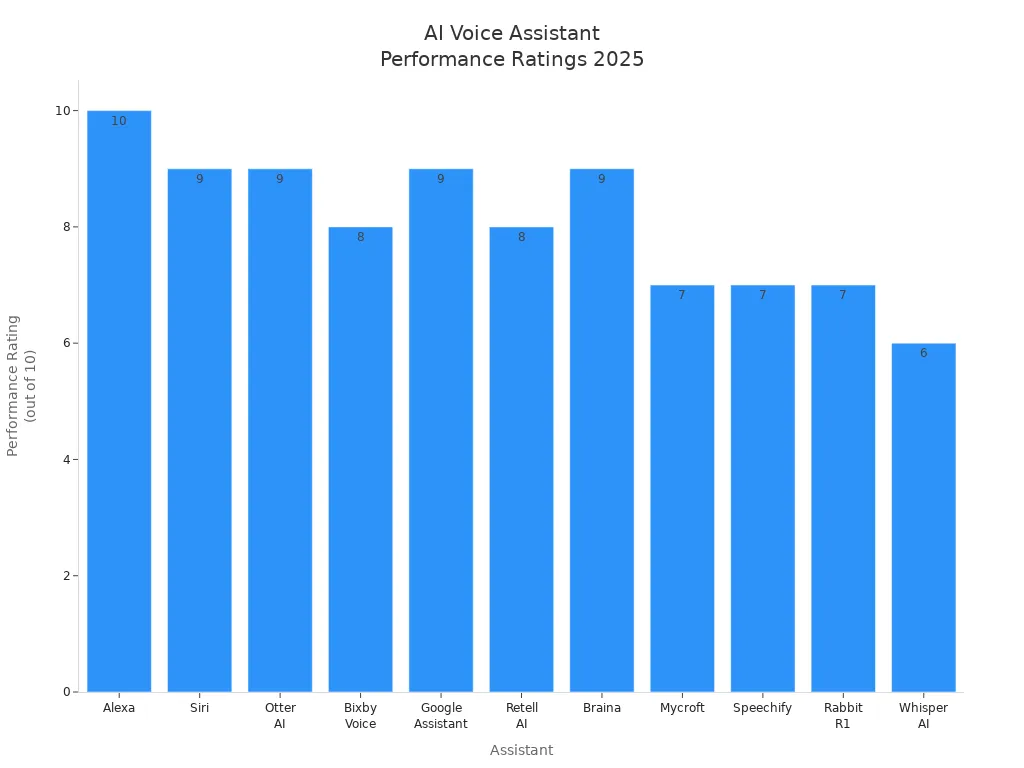
Original 2025 editorial graphic retained for context. It is not a current controlled benchmark; use the 2026 comparison and official links above for current product decisions.
Why we do not publish a single performance score
A numerical ranking looks precise, but it is only meaningful when the test set, hardware, software versions, languages, network conditions, prompts, scoring method, and test date are disclosed. Those conditions were not documented well enough in the original article to support a tested winner.
Different assistants also solve different problems. Smart-home control, conversational depth, device actions, and recording quality cannot be compressed into one honest score without assigning subjective weights. This refresh therefore uses a transparent use-case comparison and first-party documentation instead of presenting unsupported accuracy or performance percentages.
Privacy checklist before you enable voice
Voice services may process sensitive information. Privacy behavior differs by product, settings, account type, feature, and region, so avoid broad claims such as “everything stays on the device” unless the provider explicitly documents that behavior for the exact feature you use.
- Open the assistant’s privacy or data-control page before enabling voice history.
- Check whether audio clips, transcripts, and activity history are stored.
- Review options for deletion, retention, human review, and model-improvement sharing.
- Use device locks and voice-recognition features where available, but do not treat them as perfect authentication.
- Avoid speaking passwords, payment details, confidential client information, or regulated data unless your organization has approved the workflow.
- Recheck settings after major app or operating-system updates.
For current details, use each provider’s official privacy documentation rather than a third-party summary. Apple publishes a dedicated Siri and Dictation privacy notice, and OpenAI includes audio, video, transcript, and training-control information in its Voice guide.
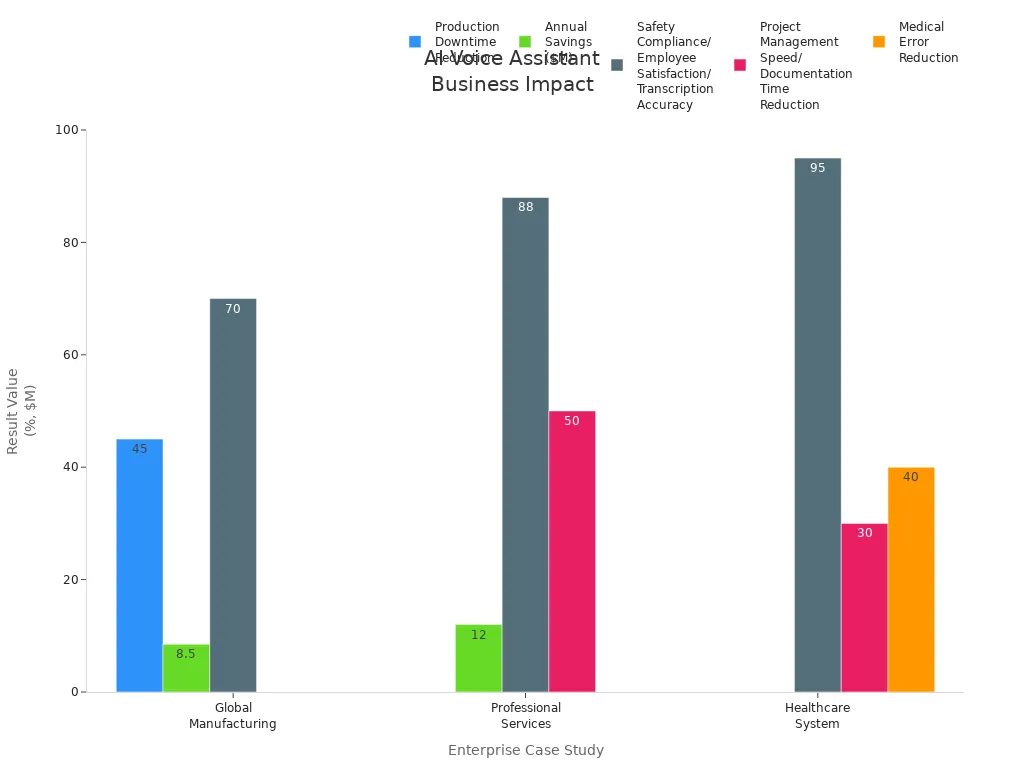
Original editorial graphic retained for historical context. Business results depend on the workflow and are not presented here as verified 2026 performance measurements.
Voice assistant vs. AI voice recorder
A voice assistant is designed to respond to a request. A voice recorder is designed to capture audio that you may need to replay, transcribe, organize, or share. The distinction matters for meetings, interviews, lectures, research notes, and calls.
| Need | Better starting point | Why |
|---|---|---|
| Set a timer, send a message, or control a device | Voice assistant | It can act on supported apps, settings, or connected devices |
| Discuss an idea or ask follow-up questions | Conversational voice assistant | It is designed for a live dialogue |
| Preserve a meeting, interview, lecture, or call | Dedicated recorder or approved recording app | The recording remains the source for later review and transcription |
If recording is your primary need, compare the current products in the UMEVO AI Voice Recorder Series. Check the product page for current specifications and plan terms. Also follow the recording-consent and privacy rules that apply where you live and work.
A simple five-minute evaluation
Try the same short checklist with the assistants available on your devices. This is not a scientific benchmark, but it reveals whether a product fits your daily workflow.
- Ask it to create a reminder with a specific date and time.
- Ask a factual question, then ask a follow-up that depends on the first answer.
- Try one device action that matters to you, such as sending a message or controlling a light.
- Repeat a request in a noisy room and with a less common name.
- Open the activity or privacy settings and confirm you can find the history and deletion controls.
Judge success by completed tasks, not by how human the voice sounds. A natural response is useful, but it does not prove that an action occurred or that the information is correct.
Frequently asked questions
What is the best AI voice assistant in 2026?
The best option depends on your ecosystem and task. Gemini is a strong starting point for Android and Google-service users, Siri for Apple device actions, Alexa+ for compatible smart homes in supported markets, ChatGPT Voice for open-ended conversation, and Bixby for Samsung device control.
Is Google Assistant still the best option for Android?
Google has been transitioning the mobile assistant experience from the classic Google Assistant to Gemini. Check Google’s current eligibility page for your device and region instead of assuming the older Assistant app is the default.
Can an AI voice assistant record and transcribe an entire meeting?
Do not assume it can. Some assistants can accept voice input or summarize selected content, but that is different from preserving a complete source recording. Use a dedicated recorder or an approved meeting-recording tool when you need a reviewable audio record.
Which voice assistant is best for privacy?
There is no responsible universal answer because processing, storage, retention, and account controls vary by feature and configuration. Compare the official privacy documentation for the exact product, device, and account you will use.
Do AI voice assistants work offline?
Some limited device commands or on-device functions may work without a connection, but many conversational, search, and cloud-connected features require internet access. Verify the specific command and device rather than treating an assistant as fully offline.
Are AI voice assistants free?
Many assistants offer a free access level, while advanced features, higher usage limits, device requirements, or subscriptions may cost extra. Pricing changes frequently and may differ by country, so use the provider’s current plan page before making a purchase.
Bottom line
Choose an AI voice assistant by ecosystem and task, not by an unsupported universal score. Start with Gemini on compatible Android devices, Siri inside the Apple ecosystem, Alexa+ for a compatible smart home in a supported market, ChatGPT Voice for extended spoken conversation, or Bixby for Samsung device control. Then verify availability, privacy settings, and the exact actions you need on your own device.
If your real goal is to preserve and transcribe meetings, interviews, lectures, or calls, use a dedicated recording workflow and treat the voice assistant as a separate tool. That distinction will prevent more disappointment than any “best assistant” ranking.





0 comments