

Introduction
Voice-to-text technology has revolutionized how we interact with our devices, transforming spoken words into written text with remarkable accuracy. This powerful tool has become essential in our daily lives and professional work, enabling hands-free communication, faster content creation, and improved accessibility.
We have entered the era of AI-enhanced voice recognition, where machine learning algorithms and neural networks have dramatically improved the accuracy and convenience of speech-to-text conversion. Modern systems can now understand context, adapt to individual speech patterns, and process multiple languages simultaneously.
This comprehensive guide will provide you with everything you need to know about enabling voice-to-text functionality, optimization techniques, troubleshooting common issues, and discovering the best AI voice recorders and software available today.
What is Voice to Text?
Definition
Voice-to-text, also known as speech recognition or speech-to-text (STT), is a technology that converts human speech into written text. This process involves sophisticated algorithms that analyze audio input, identify spoken words, and translate them into digital text format.
How It Works
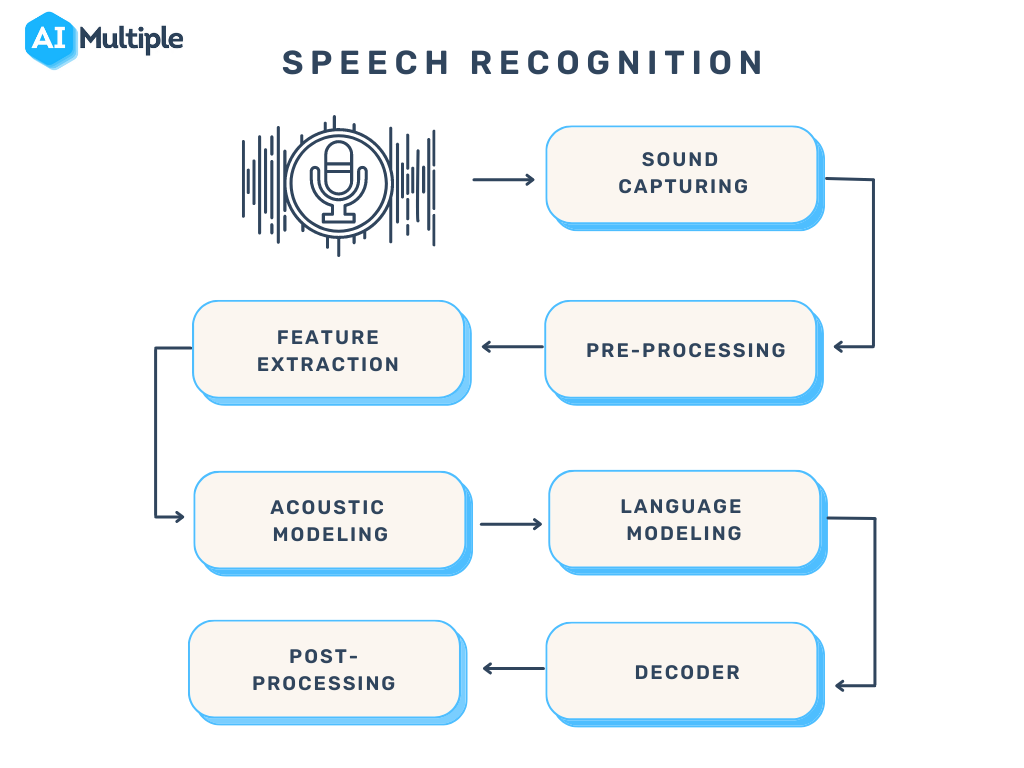
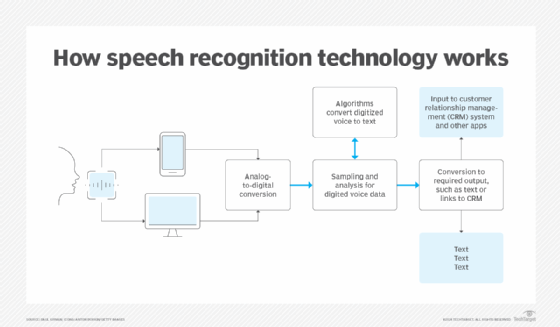
The voice recognition process involves several key steps:
- Audio Capture: Microphones capture sound waves from human speech
- Signal Processing: Digital signal processing filters and enhances the audio
- Feature Extraction: AI algorithms identify phonemes and linguistic patterns
- Language Modeling: Context and grammar rules help determine the most likely words
- Text Output: The final transcribed text is generated and displayed
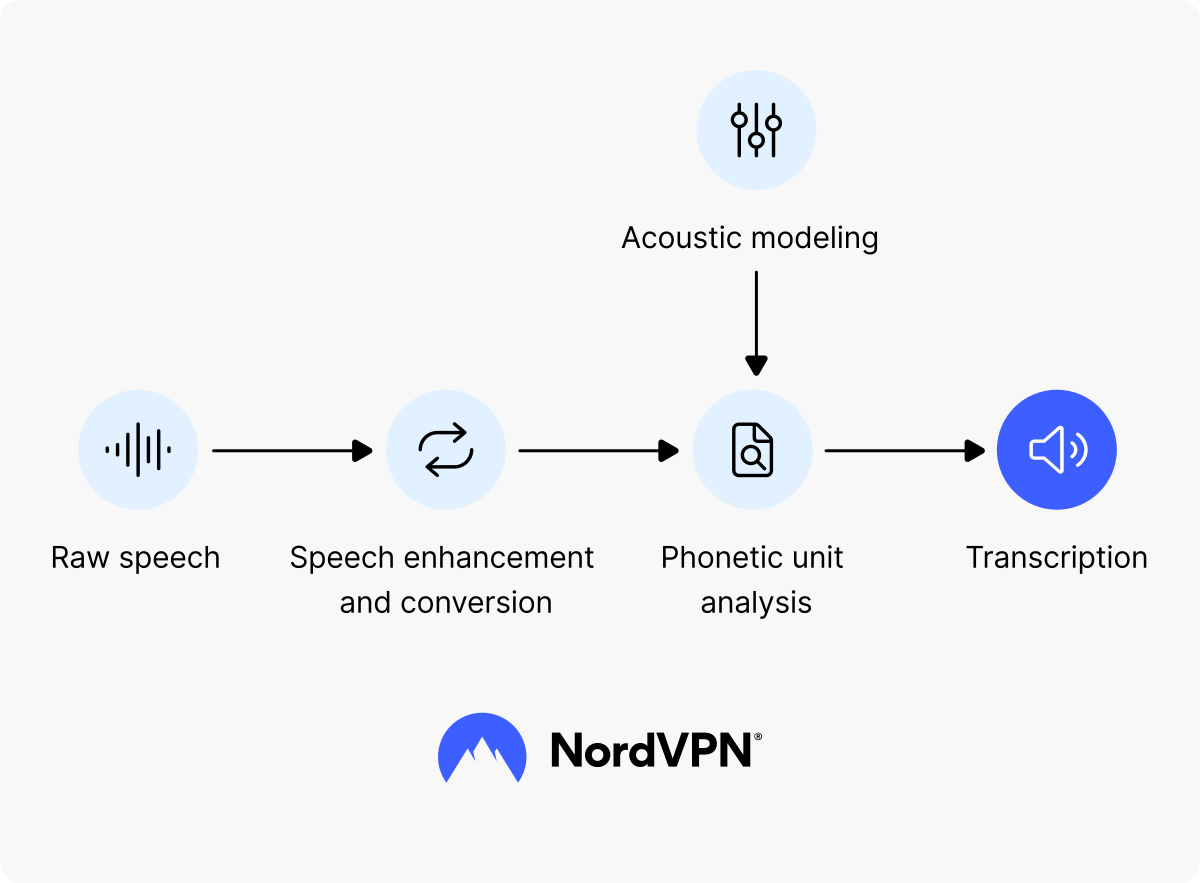
AI Technology Enhancement
Modern AI technology has significantly improved speech recognition accuracy through deep learning and neural networks. These systems can now learn from vast amounts of data, adapt to individual speech patterns, and understand context better than ever before.
History and Development of Voice Recognition
Early Development
Voice recognition technology began in the 1950s with simple systems that could recognize single digits. Early systems were limited to specific speakers and had very small vocabularies.
Mobile Revolution
The introduction of smartphones brought voice recognition to the masses. Apple's Siri, Google Assistant, and other voice assistants made speech-to-text technology accessible to everyone.
AI Breakthrough
Deep learning and neural networks have revolutionized speech recognition. Modern AI systems achieve near-human accuracy levels and can process natural language in real-time.
How to Enable Voice to Text on Different Devices
iPhone Setup
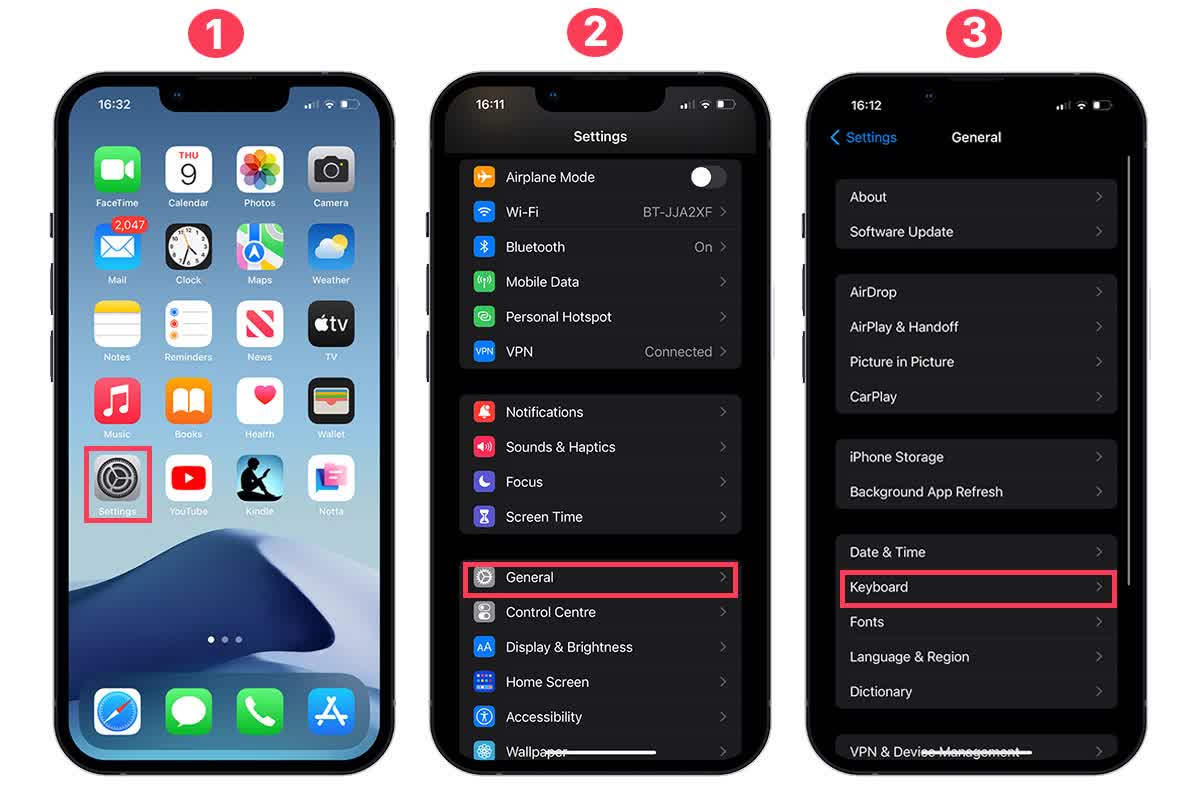
- Open Settings app on your iPhone
- Navigate to General → Keyboard
- Enable "Dictation" feature
- Choose your preferred language
- In any text field, tap the microphone icon to start voice input
Pro Tip: You can also enable "Hey Siri" for hands-free activation of voice commands and dictation.
Android Setup
- Go to Settings → System
- Select Languages & Input
- Enable Google Voice Input
- Configure voice input settings and language preferences
- On your keyboard, tap the microphone icon to start voice typing
Alternative: Download Gboard (Google Keyboard) for enhanced voice typing features across all apps.
Windows Setup
Built-in Windows Speech Recognition:
- Open Settings → Time & Language
- Click on Speech
- Enable Speech Recognition
- Complete the setup wizard
- Use Windows Key + H to activate voice typing
Third-party Software:
- Dragon NaturallySpeaking: Professional-grade accuracy
- Windows Speech Platform: Free Microsoft solution
- Cortana: Built-in voice assistant
Windows Voice Commands
- "New line" - Start new line
- "Delete that" - Delete last phrase
- "Select all" - Select all text
- "Stop listening" - Turn off voice input
Mac Setup
- Open System Preferences
- Click on Keyboard
- Go to Dictation tab
- Enable Dictation
- Choose between Basic or Enhanced Dictation
- Set keyboard shortcut (default: Fn key twice)
Enhanced Dictation: Works offline and provides continuous dictation without internet connection.
AI-Enhanced Voice Recognition Advantages
Improved Accuracy
AI models can learn and adapt to individual speech patterns, accents, and speaking styles. Modern systems achieve 95%+ accuracy rates in optimal conditions.
Real-time Processing
Advanced AI enables instant transcription, making it perfect for live meetings, lectures, and real-time communication scenarios.
Multi-language Support
AI technology enables seamless recognition across multiple languages and even provides real-time translation capabilities.

Leading AI Voice Recorders and Software
UME AI Voice Recorder
Experience the future of voice recording with the UME AI Voice Recorder - a cutting-edge hardware solution that combines advanced AI technology with professional-grade audio capture.

Otter.ai
Real-time transcription service with meeting summaries, speaker identification, and collaborative features. Perfect for business meetings and educational settings.
- • Live transcription with speaker identification
- • Meeting summaries and action items
- • Integration with Zoom, Teams, and Google Meet
- • Collaborative editing and sharing
Descript
Advanced audio editing platform with transcription capabilities, perfect for content creators and podcasters who need both recording and editing features.
- • Audio editing with text-based interface
- • Automatic transcription and sync
- • Voice cloning and overdub features
- • Multi-track editing capabilities
Top Software Recommendations
Google Voice Input
Free, cross-platform solution with excellent accuracy and multi-language support.
Dragon NaturallySpeaking
Professional-grade accuracy with advanced customization options for specialized vocabularies.
Apple Dictation
Seamlessly integrated into macOS and iOS devices with offline capabilities.
Voice to Text Accuracy and Privacy
Accuracy Factors
Environmental Factors
- • Background noise levels
- • Microphone quality and distance
- • Acoustic environment (echo, reverberation)
- • Multiple speakers or overlapping speech
Speaker Factors
- • Accent and pronunciation clarity
- • Speaking speed and rhythm
- • Vocabulary and technical terms
- • Voice characteristics (pitch, tone)
Privacy Considerations
Data Storage
Most cloud-based services store audio data for processing and improvement. This may include:
- • Voice recordings and transcripts
- • Usage patterns and preferences
- • Contact information and metadata
Protection Measures
- • Choose reputable providers with clear privacy policies
- • Use offline processing when possible
- • Regularly review and delete stored data
- • Enable two-factor authentication
Voice to Text vs Manual Typing
Voice Input Advantages
- Speed: Average 150-180 words per minute vs 40-60 for typing
- Hands-free: Perfect for multitasking and accessibility
- Natural: More intuitive for creative and conversational content
- Mobility: Works while walking, driving, or doing other activities
Manual Typing Advantages
- Precision: Better for technical content and formatting
- Privacy: Silent operation in public spaces
- Control: Immediate editing and formatting options
- Reliability: Works in any environment without connectivity
Best Use Cases
Ideal for Voice Input:
- • Long-form content creation
- • Meeting notes and transcription
- • Creative writing and brainstorming
- • Email dictation and messages
Better for Manual Typing:
- • Code programming and technical documentation
- • Detailed editing and proofreading
- • Form filling and data entry
- • Password and sensitive information input
Choosing the Best Voice to Text Software
Selection Criteria
Accuracy & Performance
- • Recognition accuracy rates (aim for 95%+)
- • Processing speed and real-time capabilities
- • Language and accent support
- • Noise reduction and filtering
Features & Integration
- • Platform compatibility (iOS, Android, Windows, Mac)
- • Third-party app integrations
- • Offline processing capabilities
- • Export formats and sharing options
Cost & Value
- • Free vs premium features
- • Subscription models and pricing
- • Usage limits and restrictions
- • Return on investment for business use
Top Recommendations by Category
Best Free Option
Google Voice Input: Excellent accuracy, multi-language support, and seamless integration across Google services.
Best Professional Solution
Dragon NaturallySpeaking: Industry-leading accuracy with advanced customization for specialized vocabularies.
Best for Apple Users
Apple Dictation: Seamless integration with macOS and iOS, offline capabilities, and privacy-focused design.
Special Situation Usage Tips
For Elderly Users
Simplified Setup
Use large font interfaces and clear, step-by-step instructions for initial configuration.
Voice Assistant Integration
Recommend Siri, Google Assistant, or Alexa for hands-free operation and assistance.
Training Tips
Start with short phrases, speak clearly, and practice regularly to improve accuracy.
Noisy Environments
Hardware Solutions
Use noise-canceling microphones and directional headsets for better audio capture.
Speaking Techniques
Speak slowly, clearly, and closer to the microphone. Use pause commands when needed.
Software Selection
Choose apps with advanced noise filtering and environmental adaptation features.
Budget-Friendly Options
Free Solutions
Google Voice Input, Apple Dictation, and Windows Speech Recognition offer excellent free options.
Built-in Features
Check device built-in capabilities before purchasing additional software or hardware.
Cost Optimization
Use free trials, compare features, and consider usage patterns before committing to paid solutions.
Frequently Asked Questions
Does voice to text support multiple languages?
Yes, most modern voice recognition systems support multiple languages. Google Voice Input supports over 100 languages, while Apple Dictation supports more than 60. Many systems can even handle multilingual conversations.
How can I improve voice recognition accuracy?
To improve accuracy: speak clearly and at a moderate pace, use a quality microphone, reduce background noise, train the system with your voice, and use proper punctuation commands. Regular use also helps the AI learn your speech patterns.
Can I use voice to text offline?
Yes, several options work offline. Apple Dictation (Enhanced), Google Voice Input (with downloaded language packs), and Windows Speech Recognition all offer offline capabilities. However, online versions typically provide better accuracy.
How do I edit and correct voice-to-text output?
You can edit transcribed text using voice commands like "delete that," "select all," or "replace [word] with [new word]." Most systems also allow manual editing with keyboard and mouse, and some offer suggested corrections.
Is voice to text secure and private?
Privacy depends on the service. Cloud-based services may store audio data for processing, while offline solutions keep data local. Always review privacy policies, use reputable providers, and consider offline options for sensitive content.
What are the best voice commands for punctuation?
Common punctuation commands include: "period," "comma," "question mark," "exclamation point," "new line," "new paragraph," "colon," "semicolon," and "quote/unquote." Practice these commands for smoother dictation.
Future Outlook
AI-Enhanced Voice Recognition Trends
Neural Network Advances
Continued improvements in deep learning will push accuracy rates even higher, with better understanding of context and intent.
Real-time Translation
Seamless multilingual communication with instant translation capabilities across languages and dialects.
Edge Processing
More powerful on-device processing will enable high-quality offline recognition while maintaining privacy.
Conclusion
Voice-to-text technology has revolutionized how we interact with digital devices, offering unprecedented convenience and accessibility. From simple dictation to complex AI-powered transcription systems, these tools have become indispensable in our daily lives and professional workflows.
The integration of artificial intelligence has significantly improved accuracy rates, making voice recognition a viable alternative to traditional typing for many use cases. Whether you're a student taking notes, a professional conducting meetings, or someone with accessibility needs, voice-to-text technology offers solutions that adapt to your specific requirements.
As we look toward the future, continued advances in AI and machine learning promise even greater improvements in accuracy, speed, and functionality. The widespread adoption of voice interfaces across all platforms ensures that this technology will continue to evolve and improve.
Getting Started Today
Start your voice-to-text journey today and discover how this powerful technology can enhance your productivity and accessibility. The future of human-computer interaction is here, and it's powered by your voice.


0 comments