

You need good meeting recording devices to save important talks and choices. The best ones are Sony ICD-UX560, Otter.ai, Granola, and Motion. Experts and buyers like these the most. Good sound, easy use, safety, and working with business tools are key when recording meetings. AI is now very important. It makes recordings better with smart tools and automation. Look at how AI and meeting tech are growing below:
|
Year |
Organizations Using AI (%) |
|
|---|---|---|
|
2023 |
2.3 |
55 |
|
2024 |
13.8 |
78 |
|
Trend |
Description |
|---|---|
|
AI finds out who is talking and checks body language for better meetings. |
|
|
Collaboration Automation |
Smart audio recorders keep track of who comes and help plan meetings. |
Key Takeaways
-
Pick a meeting recording device with good sound quality. Clear audio lets you hear every word. This makes it easy to check what was said later.
-
Find devices that are simple to use. Easy buttons and fast setup save time. This helps you catch all important parts of meetings.
-
Make sure the device has security features like encryption and password locks. Keeping your recordings safe is very important. This protects privacy and keeps things secret.
-
Think about using AI notetaking tools like Otter.ai or Granola. These tools can write down what is said during meetings. This helps you listen and join in instead of writing notes.
-
Check if the device works with popular meeting platforms. Devices that work with Zoom and Microsoft Teams make recording and sharing easier.
Best Meeting Recording Devices for Business
Quick List of Best Digital Voice Recorders
You need a meeting recording device that picks up every word. Many people use digital voice recorders for business meetings. These recorders work well and are easy to use. You can find the best ones on Amazon Best Sellers and Wirecutter. Here are some top voice recorders you might like:
-
Sony ICD-UX560: This recorder is good for small meetings. It gives clear sound and makes files easy to manage.
-
Zoom H1n: You can use this in boardrooms or bigger meetings. It records many voices and blocks out noise.
-
Zoom H4N Pro: This recorder has features for professionals. You can connect it to different audio sources at big events.
-
Olympus WS-853: This one has a long battery life and clear sound. It works well for interviews and group talks.
|
Device Name |
Rating |
Price |
|---|---|---|
|
Magnetic Voice Activated Recorder |
$35.99 |
|
|
AI Voice Recorder |
4.6 out of 5 stars |
$69.99 |
|
128GB Digital Voice Recorder |
4.3 out of 5 stars |
$35.99 |
|
64GB Voice Recorder |
4.2 out of 5 stars |
$37.99 |
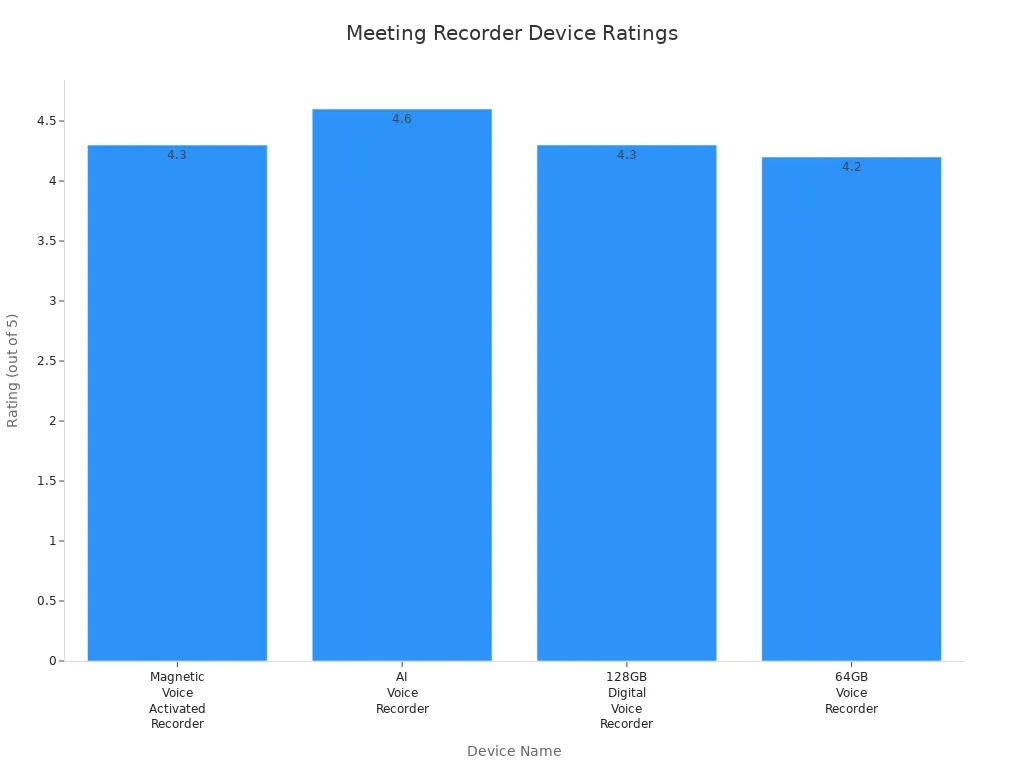
Tip: Pick a digital voice recorder with high ratings and good reviews. You will get better sound and fewer problems.
Top AI Notetaking Solutions for Meetings
AI tools now help record and organize meetings. You can use Otter.ai, Granola, or Motion to write down and sum up talks. These tools work with popular meeting apps and save time. AI can tell who is talking, mark important parts, and keep recordings safe. You get notes right away and can share them with your team. Many companies use AI to help with meetings and work.
If you want to work better, try using a digital voice recorder and an AI notetaking tool together. You will get clear sound and smart notes at the same time.
Key Criteria for Choosing a Meeting Recording Device
When you pick a meeting recording device, you want it to work well. You should think about a few important things to make sure it helps your business. Here are the main things to check:
Audio Quality and Clarity
Audio quality is very important for any meeting recording device. You want to hear every word clearly. High-definition audio lets you hear small details. This makes it easier to write down what was said. Good clarity helps you understand people, even if the room is loud. Devices with voice activation only record when someone talks. This keeps your recordings short and easy to listen to.
-
High-definition audio lets you hear things better.
-
Clear sound helps you not miss any words.
-
Voice activation saves space and keeps things neat.
-
Good clarity helps everyone talk and listen better.
Ease of Use and Setup
You want a device that is simple to use. Easy buttons and fast setup save you time before meetings. Many devices have one button to start recording. This means you will not miss anything important. Editing tools help you cut or sort your recordings quickly. If you use ai tools, you can get notes and summaries right away. This makes your work easier.
Tip: Pick a device that is easy to use. You will spend less time learning and more time on your meetings.
Security and Data Privacy
It is very important to keep your recordings safe. Look for devices that use strong encryption like AES-256. Some devices follow GDPR rules to protect your data. You want only the right people to hear your recordings. This keeps your business information private.
-
AES-256 encryption keeps your files safe.
-
GDPR rules protect your private information.
-
Passwords add extra safety to your recordings.
Integration with Meeting Platforms
Your device should work with the tools you already use. If it works with Zoom or Microsoft Teams, you save time. You can send recordings and notes to your team fast. Ai features can help by tagging who is talking and sorting files.
|
Device Name |
Price Range |
|---|---|
|
CM-1000 Conference Microphone |
$59.00 |
|
VEC CM-2000BT Bluetooth Conference Microphone |
$95.00 |
|
Olympus LS-P4 Linear PCM Digital Recorder |
$179.99 |
|
Philips LFH9172 Conference Microphone |
$179.00 |
|
Olympus ME-30W Digital Conference Microphone Kit |
$349.99 |
|
Olympus DS-9500 Conference Recording Bundle |
$549.00 |
|
Professional Olympus Conference Recording Kit |
$1,029.00 |
|
Superscope PMR61 Digital Audio Recorder |
$899.00 |
|
Start-Stop Superflow Continuous Recording System |
$1,999.00 |

You can find devices at many prices. Pick one that matches your budget and what you need. Some devices are better for big groups. Others are best for small meetings. Always check if your device can record many people at once for clear sound.
Reviews of Best Digital Voice Recorders

Sony ICD-UX560
You want a digital voice recorder with great sound. The Sony ICD-UX560 is small and easy to carry. You can charge it with USB, so you do not worry about power. It has many features that help you record and manage files fast.
|
Strengths |
Weaknesses |
|---|---|
|
High audio quality |
No erase button |
|
Compact design |
Screen fades sometimes |
|
Many helpful features |
|
|
USB rechargeable battery |
|
You get clear sound even if the room is loud. You can play back and edit your recordings easily. The screen may fade while recording, and there is no erase button. Still, the Sony ICD-UX560 is a top pick for people who need a good recorder for meetings.
Note: If you want a device that is easy to carry and works well, this one is a good choice.
Zoom H1n
The Zoom H1n is another good recorder for business. It has X/Y stereo microphones for clear sound. These microphones are great for group talks. The limiter and low-cut filter help stop noise and distortion.
-
X/Y stereo microphones give you clear sound.
-
Limiter and filter keep sound clean.
-
You can use microSD cards for long recordings.
-
The display lights up and buttons are simple.
-
It is light and easy to take anywhere.
You can save many hours of recordings with microSD cards. The display and controls are easy to use. You can play and edit files quickly. The Zoom H1n is a good choice for anyone who needs a simple and strong recorder.
Tip: Pick this recorder if you want good sound and easy controls.
Tascam DR-05X
You need a recorder with professional sound and flexible options. The Tascam DR-05X records at high quality. It supports WAV, BWF, and MP3 formats. The stereo mic picks up voices from all sides.
|
Feature/Limitations |
Description |
|---|---|
|
Stereo Mic |
Picks up voices in meetings. |
|
Recording Formats |
Supports WAV, BWF, and MP3. |
|
Battery Life |
|
|
Low Cut Filter |
Cuts background noise. |
|
Radio Interference Issue |
May have interference sometimes. |
|
Price |
Costs $119, good for business. |
You can use the Tascam DR-05X for long meetings. The screen and MicroSDXC card support make editing easy. It is made for musicians but works well for business. Some people notice radio interference, but it is rare. The Tascam DR-05X is a good choice for those who want pro features at a fair price.
Note: Use the low cut filter to make sound better in quiet rooms.
Olympus WS-853
The Olympus WS-853 is made to be reliable and easy to use. It has 8GB of memory, so you can save up to 130 hours of recordings. The MP3 recording is high quality. The USB is built-in and slides out for quick file transfer. You can lock the buttons to stop mistakes during meetings.
|
Feature |
Olympus WS-853 |
|---|---|
|
Internal Memory |
8GB |
|
Recording Quality |
High quality MP3 |
|
Battery Life |
Very good |
|
USB Connectivity |
Built-in USB |
|
Microphone Quality |
Clear sound |
|
Indexing Feature |
Yes |
|
Button Locking |
Yes |
|
Recording Time |
Up to 130 hours |
|
Design Purpose |
Good for lectures and interviews |
You will like the playback and editing tools. They help you organize and review files fast. The Olympus WS-853 is a good pick for people who need a strong recorder for long meetings. It is easy to use and starts recording with just a few clicks. The microphone is high quality, so you hear every word.
Tip: Choose this recorder if you want long battery life, lots of storage, and great sound.
Reviews of Top AI Meeting Recording Devices
Otter.ai
You want a meeting recording device that makes taking notes simple. Otter.ai is one of the most trusted ai voice recorders for business. It can write down what people say during meetings right away. This helps you remember every detail. The sound stays clear, even when many people talk at once. Otter.ai uses smart ai transcription to know who is talking and adds timestamps. This makes it easy to look back at your recordings.
You get many features that help you work better:
-
Custom vocabulary and name recognition let Otter.ai learn your business words. This gives you more accurate notes.
-
Outline summary and Otter Assistant show you meeting summaries. You can send these outlines to your team by email.
-
File synchronization with Dropbox and Zoom keeps your notes in order. You will not lose important recordings.
-
Live meeting and media transcription let you write down meetings as they happen. You can see who talks and when.
-
Otter Assistant is like your own note-taker. It can join meetings for you and make notes if you cannot go.
Tip: Use Otter.ai to help you get more done. You will spend less time writing notes and more time paying attention in meetings.
Otter.ai is great for teams that need good note-taking devices and transcription services. You get your notes right away and can share them with others. The ai voice recorders from Otter.ai help you keep your business neat and running well.
Granola
Granola is a strong choice for businesses that want fast and correct ai transcription. You can use Granola to write down meetings with good sound. The platform uses ai to know who is talking and keeps track of action items. This makes it one of the best note-taking devices for busy teams.
Here is how Granola makes your meetings better:
|
Feature |
Description |
|---|---|
|
Granola writes down meetings as they happen, so you do not miss anything. |
|
|
Speaker Recognition |
The AI knows who is talking, which helps you track what people say and manage action items. |
|
Enhance Notes |
You can add your notes from before the meeting to the transcript for a full summary after. |
|
Integration |
Granola works with tools like Slack and Notion, making your work easier and helping you get more done. |
|
Action Item Tracking |
It highlights promises made in meetings, gives jobs to people, and sets reminders. |
You get real-time transcription and speaker recognition. These help you follow talks and give out tasks. Granola lets you add your notes to the transcript, so you have a full summary after each meeting. You can connect Granola with Slack and Notion to keep your work smooth. The sound stays good, and you do not miss anything important.
Note: Granola is a smart pick if you want to make note-taking and action tracking automatic. You save time and help your team stay responsible.
Granola’s ai voice recorders make it easy to handle meetings and keep everyone working together. You get fast transcription services and easy connections with your favorite business tools.
Motion
Motion brings more automation to meeting recording devices. You can use Motion to write down meetings and organize your notes with little work. The ai voice recorders from Motion focus on giving you clear sound and quick results. You get automatic summaries and action item tracking, which help you stay on task.
Motion uses ai transcription to work on your recordings and point out key ideas. You can share notes with your team right away. The platform works with popular meeting apps, so you do not have to switch tools. You get note-taking devices that work for both in-person and online meetings.
Tip: Pick Motion if you want to make your work easier. You will spend less time handling recordings and more time making choices.
Motion’s meeting recording device helps you catch every word with clear sound. You can trust Motion to give you correct transcripts and helpful insights. The ai features make it simple to keep your business neat and working well.
Pros, Cons, and Use Cases
Best Voice Recorders for Small Meetings
You need good voice recorders for small meetings and classes. These devices help you hear every word with clear sound. The Sony ICD-UX470 is small and has extra storage. You can carry it anywhere and record without worry. The Zoom H6 has pro features for people who want more options. The Akaluli Digital Voice Recorder is cheap and simple to use. AI voice recorders can write down what is said, so you can pay attention to the talk.
|
Model |
Key Features |
|---|---|
|
Sony ICD-UX470 |
Compact, expandable storage, quick charging |
|
Zoom H6 |
Pro features, great audio quality |
|
Akaluli Digital Voice Recorder |
Affordable, easy to use |
|
AI Voice Recorder |
Transcribe, efficient meeting documentation |
Tip: Pick a recorder with good playback and editing tools. It will be easier to go over meetings and classes later.
Digital Voice Recorders for Large Conferences
Big meetings and classes need recorders that pick up sound from far away. The Sony ICD-UX570 turns on fast and records clear sound in large rooms. The Sony ICD-PX470 is less expensive and has long battery life. The OM System WS-883 has 8GB of memory and charges with USB. This makes it good for long meetings and classes. These recorders let you play back and edit your recordings easily.
|
Model |
Key Features |
|---|---|
|
Sony ICD-UX570 |
Lightweight, instant power-up, LPCM recording |
|
Sony ICD-PX470 |
Budget-friendly, AA batteries, clear sound |
|
OM System WS-883 |
8GB memory, USB rechargeable, good distance |
Note: For big classes and meetings, choose a recorder with strong sound and playback. This helps you review long sessions.
AI Solutions for Remote Teams
AI voice recorders help remote teams work better in meetings and classes. These tools give you correct notes, so you do not have to write everything down. AI voice recorders make it simple to write and share recordings. This helps everyone work together. You can look at meeting and class notes anytime, even if you miss the live talk. Playback and editing tools help you find important parts and share them with your team. AI voice recorders help people work at different times, making meetings and classes easier for all.
Tip: Use AI voice recorders to write down meetings and classes for you. This saves time and helps everyone stay updated.
Comparison Table and Quick Evaluation
Feature Comparison Table
You want to find the best meeting recording device for your business. The table below shows how top devices are different. It lists features, price, sound quality, and how they work with other tools. This helps you pick what you need.
|
Device Type |
Key Features |
Usage Scenarios |
|---|---|---|
|
Small size, good microphones, long battery, easy file moves |
Secret recording at work or home |
|
|
Stops noise, writes words as you talk, smart search |
Business meetings, school work, law jobs |
|
|
Voice Recorders with Transcription |
Changes speech to text fast, fewer mistakes |
News, work meetings, classes |
|
Device |
Price Range |
Audio Quality |
Integration Capabilities |
|---|---|---|---|
|
$180 - $200 |
High |
USB audio interface |
|
|
Sony PCM-A10 |
$220 - $240 |
Pro-level |
Bluetooth |
|
DJI Mic |
$250 - $300 |
Very clear |
Wireless up to 250 meters |
Evaluation Guide
You need a device that fits how you work. If you want fast notes from meetings, use an ai voice recorder. These devices use smart tools to write what people say and sort notes. You get clear sound and can share it with your team.
-
Mini voice recorders are good for private talks or when you travel. They last long and move files easily.
-
AI voice recorders help you write and search your recordings. You save time and make fewer mistakes.
-
Devices with transcription are best for news writers and workers who need fast text from sound.
Think about what you need most. If you want great sound for interviews or music, pick the Tascam DR-40X. For outside use and Bluetooth, the Sony PCM-A10 is a good choice. If you need to record far away and want pro sound, the DJI Mic is best.
Tip: Always check if your device can write words and work with your favorite business tools. This makes your work easier and helps you get more from your recordings.
You can choose a device that matches your money and your work needs. Use this guide to help you decide fast and make your meetings better.
Addressing Business Concerns
Data Privacy in Meeting Recording Devices
It is important to keep private information safe when recording meetings. Many devices have strong security to protect your recordings. Encryption helps make sure only the right people can open files. Passwords add extra safety for your files. Host controls let you pick who can see or share recordings. Secure file sharing lets you send files to the right people without worry. AI voice recorders use safe ways to keep talks private. You should save files in safe cloud storage to stop leaks. Always check if your device follows GDPR rules and business standards.
|
Concern Type |
Description |
|---|---|
|
Recording meetings without consent can lead to legal issues. |
|
|
Data Storage and Compliance |
Recordings must comply with data retention policies and may require encryption. |
|
GDPR Compliance |
Recordings must be stored securely and processed lawfully. |
|
Ethical Considerations |
Participants should know about recordings and give consent. |
|
Data Protection Impact Assessment |
A DPIA helps you find risks and stay compliant. |
Tip: Always tell people before recording and use devices with strong encryption.
Multi-Speaker Support
You want to hear everyone clearly when many people talk. Devices with more than one microphone help you catch every voice. Dual wireless mic systems are good for interviews and panels. Noise cancelling blocks out sounds you do not want. Microphone arrays help you hear only the speakers, not the background. Real-time processing keeps voices clear and makes meetings better.
|
Feature |
Description |
|---|---|
|
Multiple Microphone Support |
Dual wireless mic support enables two-person presentations and Q&A sessions. |
|
Recommended Device |
NearStream AWM25T Wireless Mic & Speaker System supports two microphones. |
-
Devices with noise cancelling work well in loud rooms.
-
Microphone arrays help you hear voices, not noise.
-
Real-time processing keeps sound clear.
Compatibility with Digital Meeting Platforms
You need devices that work with popular meeting apps. Many top meeting recorders connect easily to Zoom and Microsoft Teams. This makes it easy to record, share, and save files in the cloud. Some devices have cameras, speakers, and microphones all in one. AI voice recorders often work with cloud services for fast sharing and storage. You can use these devices for both in-person and online meetings.
|
Device Name |
Compatibility with Zoom |
Compatibility with Microsoft Teams |
Features |
|---|---|---|---|
|
Logitech MeetUp |
Yes |
Yes |
All-in-one camera, speaker, and mic |
|
Poly Studio P15 |
Yes |
Yes |
AI-powered, auto-framing |
|
Yealink UVC30 |
Yes |
Yes |
Ultra HD, wide field of vision |
Note: Pick devices that work with your favorite apps and make it easy to save and share recordings in the cloud.
You should pick a device that fits your needs. For small meetings, digital recorders give clear sound and easy notes. Big conferences need ai tools for good summaries. Remote teams use ai to organize and share meeting notes. Using business tools helps you get to your notes and recordings faster. Check the table below for steps to keep your device working well:
|
Actionable Steps |
Description |
|---|---|
|
Understand Features |
Check call quality, how many people it can handle, teamwork tools, and recording options for your business. |
|
Ensure Reliable Support |
Find platforms with help all day, live chat, and lots of online guides to stop problems. |
|
Focus on Security |
Use safe storage, encryption, and control who can see files to keep recordings safe and follow privacy rules. |
|
Utilize Advanced Features |
Try automatic transcription and captions to help everyone, and make sure it can tell who is talking. |
Using business tools makes meetings and lectures easier and keeps notes in one place. This helps you get more done. You can get warranty and tech help for digital recorders, wireless microphones, and USB microphones. For more info, go to the Sound Professionals website.
FAQ
What features should you look for in a meeting recording device?
Look for clear sound and long battery life. Make sure you can move files easily. Strong security keeps your recordings safe. Devices that work with meeting apps help you save time. They also keep your files neat and easy to find.
How does ai help with meeting recordings?
ai can write down what people say. It knows who is talking and makes summaries. You get notes and action items right away. This helps you pay attention in meetings. You do not have to write everything yourself.
Are meeting recordings secure?
Most devices use encryption and passwords. You decide who can see your files. Pick devices that follow privacy rules. Safe cloud storage keeps your recordings protected.
Can you use these devices for remote meetings?
Yes, you can use them for online meetings. Many devices and apps work with remote platforms. You can record, write notes, and share with your team. Everyone can join from different places.





0 comments