

Think about a tool that changes speech into written notes fast. That’s what an AI voice recorder like the UME AI Voice Recorder does. It makes transcription and note-taking easy with live transcription, smart summaries, and clear recordings. Whether you’re in a meeting, class, or sharing ideas, this recorder helps you catch every detail easily. With smart AI tools, you save time and focus on important things.
Key Takeaways
AI voice recorders, like the UME AI Voice Recorder, change speech into text fast. This makes taking notes and writing transcripts simple.
Features like live transcription and noise removal make words clearer. These tools help users focus on talks without getting distracted.
The UME AI Voice Recorder works with over 59 languages. It’s great for people worldwide in meetings or classes.
Using this recorder saves time by giving quick summaries and correct transcripts. This lets you focus on main ideas.
Safe cloud storage keeps your recordings protected and easy to find. It ensures your data stays private and well-organized.
What Is an AI Voice Recorder?
Definition and Overview of AI Voice Recorders
An AI voice recorder is a smart tool that turns sound into text. It uses artificial intelligence to do more than just record audio. These devices can write down conversations, pick out main ideas, and block out background noise. This makes them great for classes, meetings, or personal notes. With AI, you don’t just get a recording—you get help staying organized and saving time.
How well these tools work depends on how accurate they are. Good AI recorders usually get 80% to 90% of words right. They also use emotion detection to understand feelings in talks, making them even better for users.
Key Features of the UME AI Voice Recorder
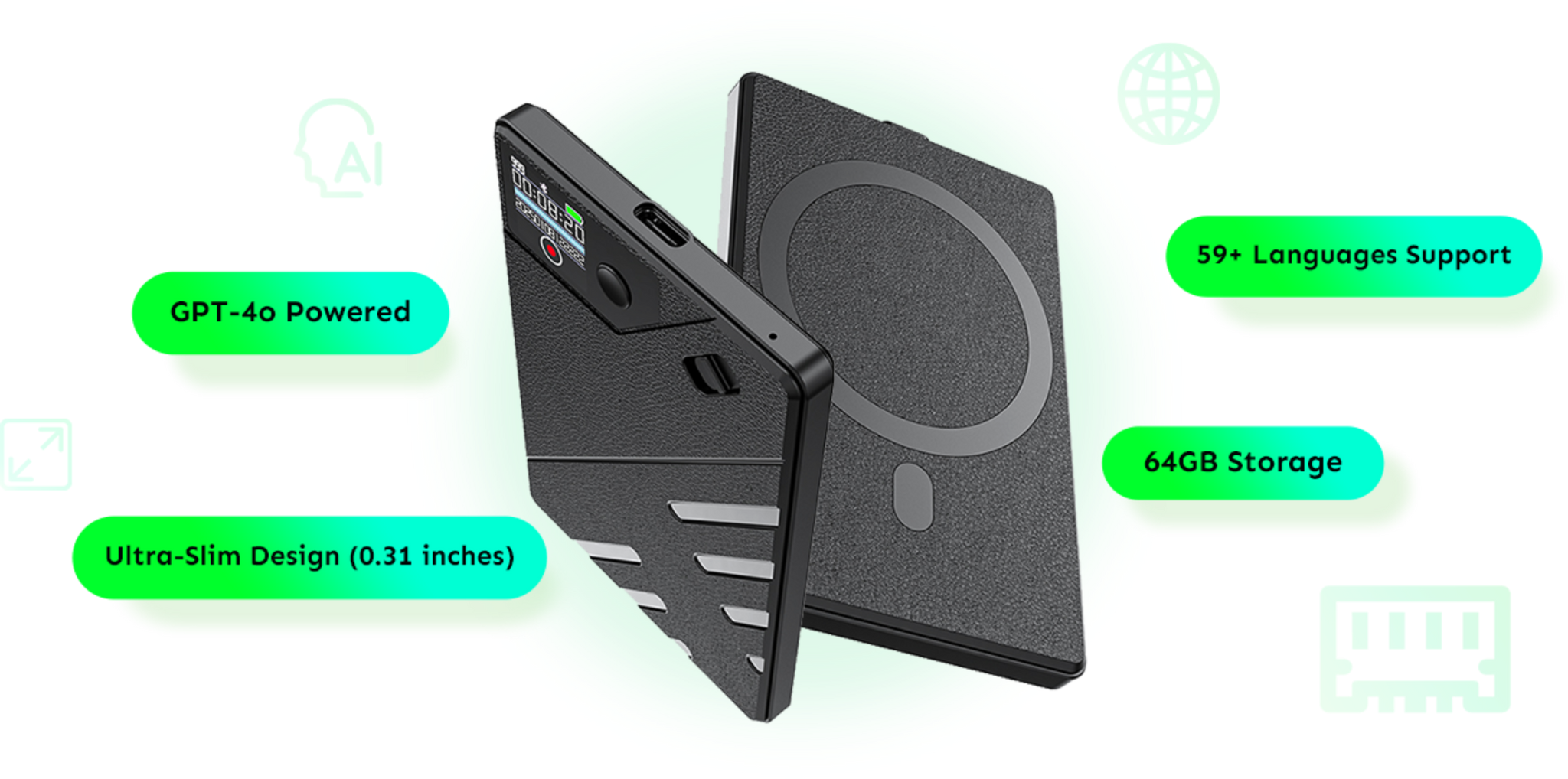
The UME AI Voice Recorder has some amazing features. It uses GPT-4 for very accurate transcriptions and summaries. Here’s why it’s special:
- Real-time transcription: Changes speech into text right away.
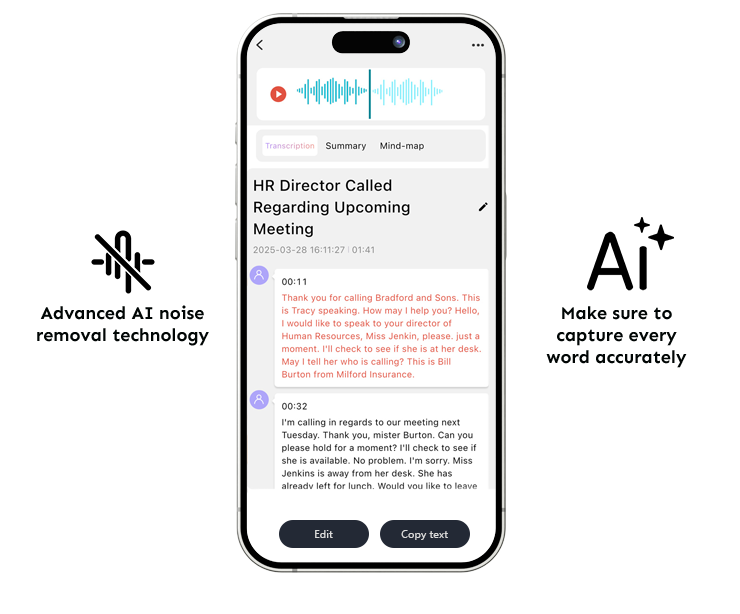
- Noise removal technology: Makes recordings clear, even in loud places.
- Multi-language support: Works with over 59 languages for global users.
- Compact design: Thin and easy to carry at 0.31 inches.
- Secure cloud storage: Keeps your files safe and private.
These features make the UME recorder a great pick for students, workers, or anyone needing a smart recording tool.

Types of AI Voice Recorders Available
AI voice recorders come in different styles for different needs. Here’s a simple comparison:
|
Type of Recorder |
Features |
Limitations |
|---|---|---|
|
Easy to carry, great sound quality, advanced options. |
May not connect to other devices. |
|
|
Wearable Recorders |
Small and easy to use while moving around. |
Short battery life. |
|
Smartphone-based Recorders |
Apps with auto transcription and cloud storage. |
Needs phone battery and space to work. |
Smartphone-based recorders are very popular. They work well with apps that sync to the cloud and write text automatically. This makes them easy and flexible to use.
How to Use the UME AI Voice Recorder for Transcription and Note-Taking
Step-by-Step Guide to Recording Audio
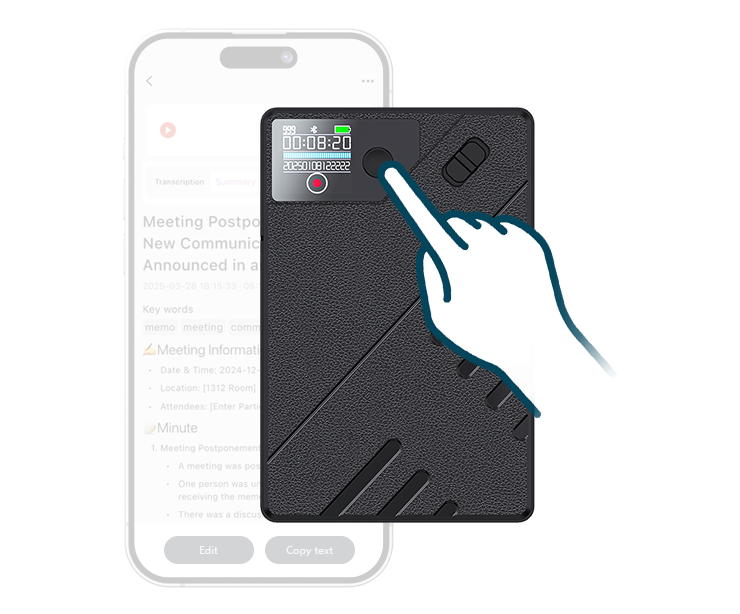
Using the UME AI Voice Recorder is easy. Follow these steps to record clear audio:
- Turn On the Recorder: Press the power button to start. Its slim design makes it simple to carry anywhere.
- Pick a Recording Mode: Choose the best mode for your location. The noise removal feature keeps audio clear in loud or quiet places.
- Begin Recording: Press the record button to start. Files are saved automatically in the 64GB storage.
- Watch Real-Time Transcription: While recording, speech turns into text instantly. This helps you stay organized and catch every detail.
- Save and Retrieve Files: After recording, save your file. Access it later through secure cloud storage for privacy and convenience.
Follow these steps to record great audio for transcription or notes.
How to Transcribe and Summarize Notes with AI
The UME AI Voice Recorder makes transcription and summaries simple. Here’s how to use its smart features:
- Easy Transcription: After recording, GPT-4 creates accurate transcripts. It works in 59+ languages, perfect for global users. Meetings and lectures are transcribed quickly and reliably.
- Quick Summaries: The AI condenses long recordings into main points. This saves time by showing the most important details.
- Check and Edit: Review transcripts and summaries for accuracy. The AI does well, but you can make changes if needed.
With transcription and summaries, this recorder keeps you organized and productive.
Tips for Maximizing the UME AI Voice Recorder’s Features
Use these tips to get the best results from your recorder:
- Set Up Your Space: Reduce background noise for better audio. The noise removal feature works well, but quiet spaces are even better.
- Use Live Transcription: Turn this on during meetings or classes to take notes fast. It helps you focus while capturing key ideas.
- Try Multi-Language Support: Use the 59+ language feature for international work or study. It’s great for teams or students who speak different languages.
- Keep Files Safe: Save recordings in the cloud for privacy and easy access. Only you can open them, keeping your data secure.
- Update Regularly: Update the device often to get new features. This ensures the AI tools work their best.
These tips help you use the UME AI Voice Recorder fully and make note-taking easier.
Benefits of Using AI Voice Recorders for Productivity
Time-Saving and Efficiency
Think about spending hours writing meeting notes or transcribing recordings. AI voice recorders save time by doing this work for you. They turn speech into text and summarize it quickly. This lets you focus on important tasks instead of boring details.
Here’s how they help save time:
- AI summaries turn long talks into short, clear points. You get the main ideas fast without reading pages of notes.
- Transcribing by hand takes hours, but AI tools finish in minutes. This gives you more time for other work.
- Tracking tasks is simple. The recorder finds deadlines and follow-ups, so you don’t forget anything.
Check out the productivity benefits:
|
Benefit |
Description |
|---|---|
|
Better Meeting Focus |
AI lets you join discussions without worrying about taking notes. |
|
Quick Summaries |
AI creates short summaries, saving time on long transcripts. |
|
Easy Task Tracking |
Find action items and deadlines quickly for better follow-ups. |
Using an AI voice recorder helps you focus on big ideas while it handles the small stuff.
Clear Recordings and Accurate Notes
Getting accurate notes is important for meetings or classes. AI voice recorders, like the UME AI Voice Recorder, make sure your notes are correct and easy to trust.
They also remove background noise. Even in loud places, the recorder gives clear audio. This makes it great for offices, classrooms, or outdoor spaces.
Here’s a comparison of transcription methods:
|
Method |
Accuracy Rate (Avg) |
Error Rate |
|---|---|---|
|
~99% |
~1% error |
|
|
AI Transcription (Real) |
61.92% (mean) |
~38% error |
|
AI Transcription (Typical) |
57–69% |
43–31% error |
Human transcription is still the best, but AI tools are improving fast. The UME AI Voice Recorder uses GPT-4 to make transcription more accurate and reliable.
Useful for Meetings, Classes, and Personal Notes
AI voice recorders work well in many situations. They’re great for meetings, lectures, or personal use. Professionals, students, and anyone who wants to stay organized can benefit from them.
In meetings, the recorder writes down everything and turns it into helpful notes. You can focus on talking without worrying about missing details. For classes, it simplifies hard topics into easy summaries, making studying easier.
It’s also useful for personal tasks. Whether you’re brainstorming ideas or tracking goals, the recorder keeps your thoughts safe and clear. Its small size and ability to work in many languages make it perfect for people who travel or work globally.
With features like live transcription, summaries, and task tracking, the UME AI Voice Recorder is a handy tool for all kinds of situations.
Key Considerations When Choosing an AI Voice Recorder
Pricing and Value of the UME AI Voice Recorder
When buying an AI voice recorder, cost is important. You need one that’s affordable but still has great features. The UME AI Voice Recorder costs $97.99 and offers a lot. It includes tools like live transcription, noise removal, and smart summaries. It also supports over 59 languages, making it useful worldwide.
Think about what you’re getting for the price. With 64GB storage and secure cloud access, you won’t run out of space or lose files. Free shipping, a 30-day return policy, and lifetime support make it even better. For less than $100, this recorder gives you top features without spending too much.
Compatibility with Devices and Platforms
You don’t want a recorder that works with only some devices. The UME AI Voice Recorder is easy to connect. It works with iOS and Android, so you can use it on phones, tablets, or computers. This makes recording and managing files simple anywhere.
The recorder also connects smoothly to cloud storage. This means your files are always easy to find. Whether you’re using a laptop or phone, you can quickly access and share recordings. It’s perfect for busy workers or students using different devices.
Privacy and Security Features
Keeping your files safe is very important. The UME AI Voice Recorder protects your recordings with secure cloud storage. Only you can access your files, keeping private information safe.
It also keeps your data secure when connecting to other platforms. You don’t have to worry about leaks or unauthorized access. With encrypted storage and user-only access, the UME AI Voice Recorder keeps your files private and gives you peace of mind.
Real-Life Applications of AI Voice Recorders
Using AI Voice Recorders in Meetings and Business
AI voice recorders make meetings and work easier. Imagine not needing to write notes or worry about missing details. Tools like the UME AI Voice Recorder record everything while you focus on talking. It turns speech into clear, searchable notes for later use.
These devices also help track tasks and deadlines. Instead of searching through messy notes, you can quickly find what you need. Many professionals use AI recorders with apps like Asana or Monday. This makes turning meeting ideas into actions simple and fast.
Whether brainstorming or making deals, the UME AI Voice Recorder keeps your notes accurate. It’s like having a helper that remembers every detail for you.
Applications in Education and Lectures
AI voice recorders are changing how students learn. Imagine focusing on a lecture without rushing to write notes. These tools transcribe lessons live, letting you pay attention to the teacher.
Students love how these devices organize information. The UME AI Voice Recorder doesn’t just record—it sorts notes for easy access. This helps students study better and remember more. Studies show recorded lectures improve grades in most cases.
Here’s how AI voice recorders help students:
|
Benefit |
Description |
|---|---|
|
Attendance Impact |
Most studies show no drop in class attendance. |
|
Grade Improvement |
Recorded lectures often lead to better grades. |
|
Student Feedback |
Students say recordings are very helpful for studying. |
With features like sharing notes and language support, AI voice recorders make learning easier for everyone.
Personal Note-Taking and Journaling
AI voice recorders are great for personal use. Whether tracking goals or writing thoughts, they make staying organized simple. These tools transcribe and sort your audio notes for quick access later.
Professionals use AI recorders for interviews or brainstorming sessions. Instead of wasting time searching, you can find information fast. The UME AI Voice Recorder works with apps to turn ideas into plans easily.
People love how these recorders boost creativity and productivity. You can save ideas quickly, organize them, and revisit them anytime. It’s perfect for keeping your thoughts safe and easy to find.
AI voice recorders, such as the UME AI Voice Recorder, help simplify tasks. They make turning speech into text quick and easy. In meetings or classes, you won’t miss important details. The AI tools keep your notes clear and organized. This device saves time and boosts productivity. Try the UME AI Voice Recorder now to improve how you work and take notes!
FAQ
What makes the UME AI Voice Recorder special?
The UME AI Voice Recorder uses GPT-4 for accurate transcription. It removes noise in real-time and supports 59+ languages. Its slim size and secure cloud storage make it great for students and professionals.
Can I use the UME AI Voice Recorder offline?
Yes, you can record audio without the internet. But features like live transcription and cloud storage need an internet connection to work.
Is my data safe with the UME AI Voice Recorder?
Yes, your data is very safe. Files are stored in encrypted cloud storage, and only you can access them. This keeps your recordings private and secure.
Does the UME AI Voice Recorder work on all devices?
Yes, it works with iOS and Android devices. You can manage and access files easily on phones, tablets, or computers.
How long can I record with the UME AI Voice Recorder?
The recorder has 64GB of storage, letting you record for hours. It’s perfect for long meetings, lectures, or brainstorming ideas.





0 comments