

Quick answer: UMEVO Note Plus is best suited to people who regularly need to turn meetings, interviews, lectures, phone calls, or spoken ideas into material they can review and reuse. The recorder handles capture; AI DVR Link handles synchronization, transcription, summaries, speaker labels, mind maps, translation, and sharing. Its value comes from that connected workflow. It is less suitable for someone who only records an occasional voice memo, needs high-fidelity music production, or requires a fully offline AI process.
Review disclosure: UMEVO publishes this article and sells UMEVO Note Plus. This is a documentation-based evaluation of the current product and app workflow, not an independent laboratory test. Published battery, storage, weight, language, and plan details are identified as manufacturer information. No controlled environmental test, measured accuracy test, or battery endurance test was performed for this review.
Updated September 21, 2026. Product and app details were checked against the current UMEVO product page, Help Center, product manual, and AI DVR Link App Guides. Prices, promotions, plans, and app features can change.
Jump to: verdict · how it works · workflow · use cases · results and limits · specifications · who it is for · FAQ
UMEVO Note Plus review: the verdict at a glance
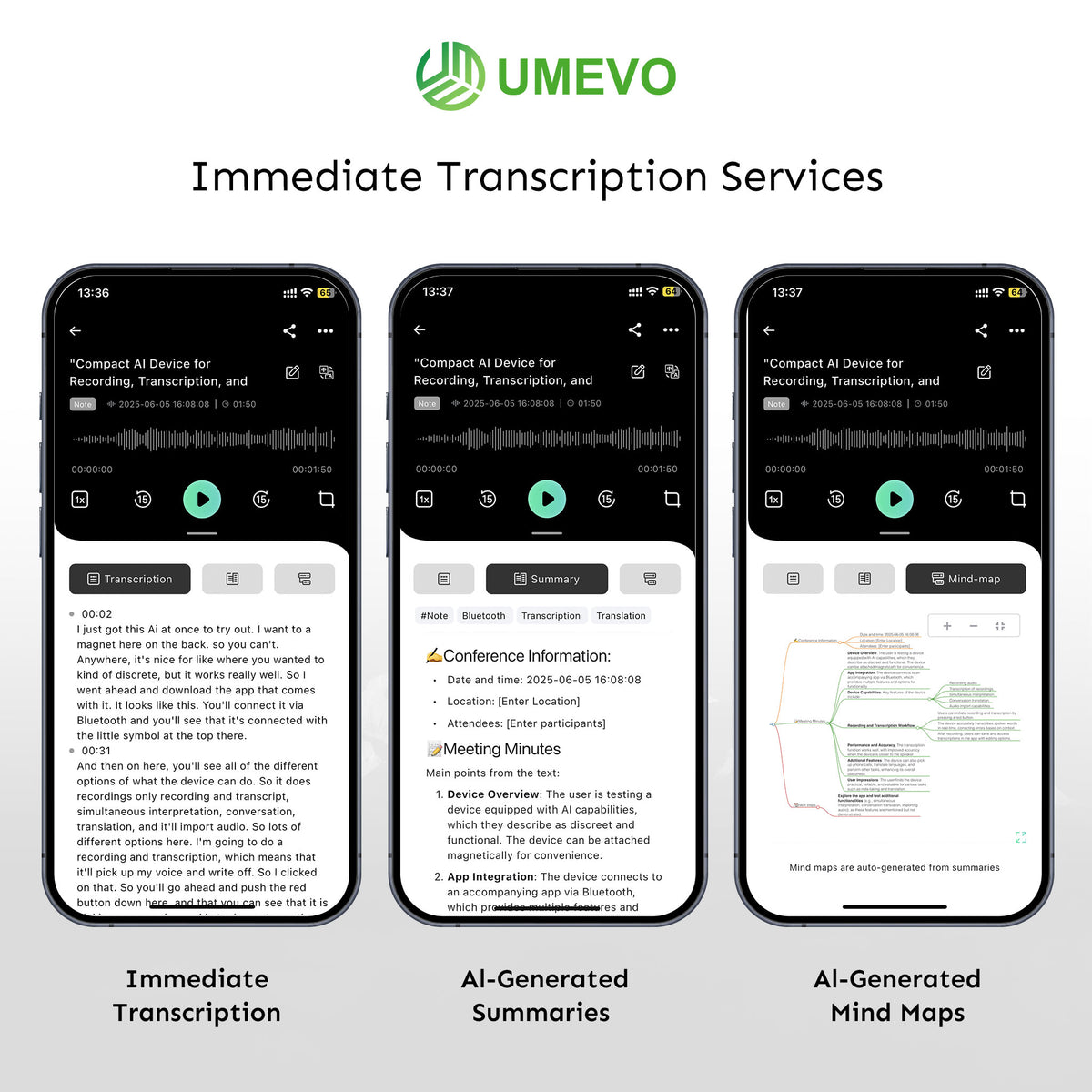
UMEVO Note Plus makes the most sense as a capture-to-notes system rather than as a recorder judged only by a list of specifications. A physical button and separate NOTE and CALL modes make recording intentional. The companion app then provides the tools that turn a saved audio file into a searchable transcript, a structured summary, a mind map, a translation, or a shareable output.
The right question is therefore not simply “Is it worth buying?” It is whether you record often enough, and review enough spoken information, to benefit from dedicated capture hardware plus an app-based processing workflow.

How UMEVO Note Plus and AI DVR Link work together
The hardware and app do different jobs. Note Plus captures and stores audio. AI DVR Link provides the documented connection, synchronization, transcription, speaker identification, summary, mind-map, translation, file-management, sharing, and Ask AI features. A generated transcript or summary is a working output; the audio remains the reference for names, numbers, decisions, deadlines, and quotations.
This division is helpful because a problem can be traced to the correct stage. If a voice is faint in the original audio, improve placement or the recording environment. If the audio is clear but the transcript contains an incorrect name, correct the text while preserving the recording. If the transcript is accurate but the summary omits a commitment, review the relevant passage before distributing the summary.
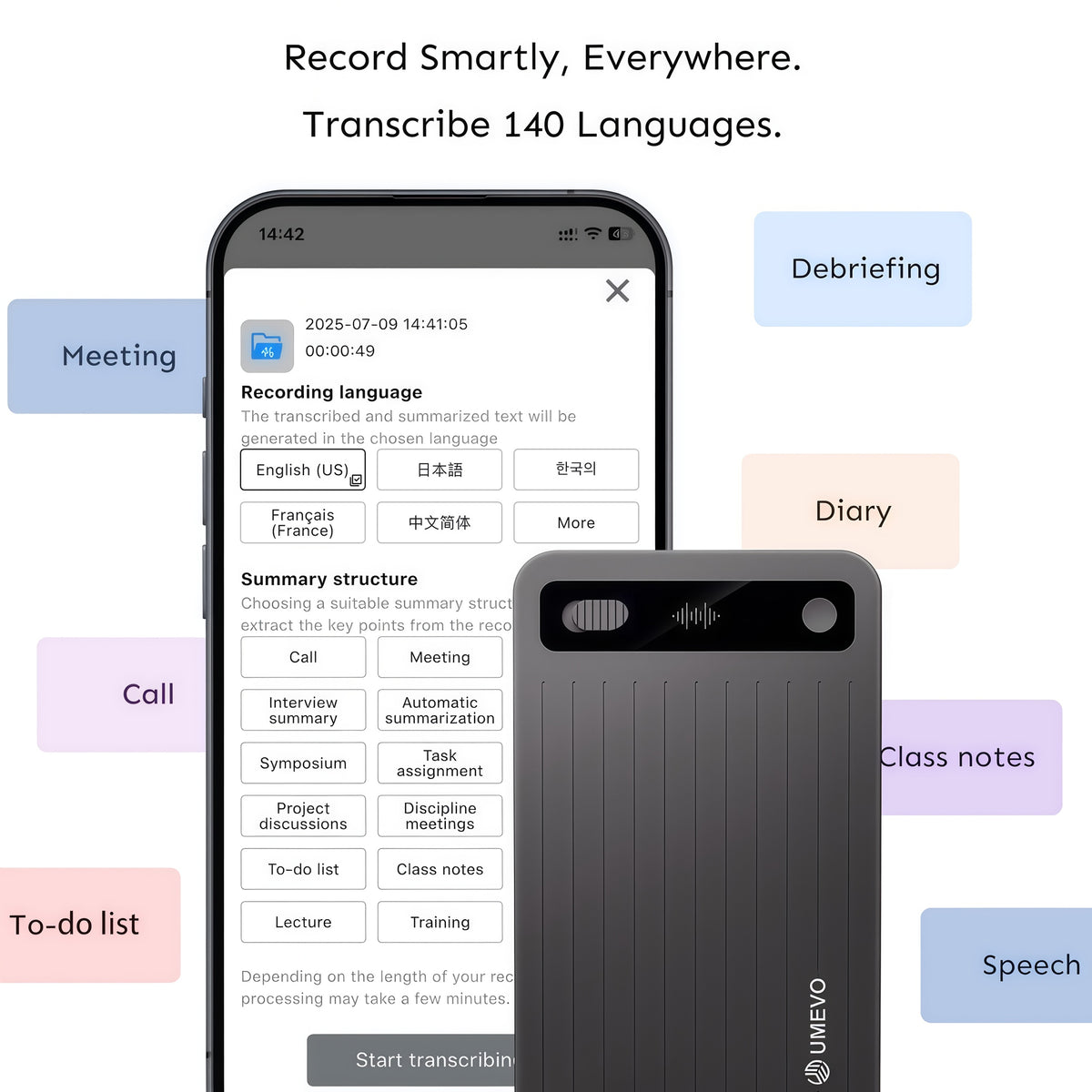
From conversation to reviewed notes
| Stage | What to do | What to verify |
|---|---|---|
| Prepare | Choose NOTE or CALL mode, position the recorder, confirm available storage and battery, and obtain required permission. | The correct mode, a stable position, and a short test recording. |
| Capture | Start recording with the physical control and avoid covering or moving the recorder unnecessarily. | The device feedback, elapsed time, and the beginning of the saved audio. |
| Synchronize | Open AI DVR Link, connect the device, and synchronize the intended file. | Filename, date, duration, beginning, and ending. |
| Generate | Select the recording language and create a transcript, summary, mind map, translation, or Ask AI response. | The correct source language and an output type that matches the task. |
| Review | Compare high-impact details with the recording and correct the working document. | Names, figures, dates, negation, speaker labels, decisions, owners, and deadlines. |
| Use or share | Export or share only the reviewed output the recipient needs. | Consent, context, confidentiality, access, and retention. |
This review step is central to the product’s value. AI can reduce the time needed to search and structure a recording, but it should not be asked to silently replace the source. UMEVO’s transcript-checking protocol provides a repeatable way to inspect names, numbers, terminology, speaker labels, and summary claims.
Where UMEVO Note Plus fits best
These use cases share one requirement: the recording must be deliberate. In a meeting, place the recorder where voices are not blocked by a laptop, papers, clothing, or a bag. On a phone, case thickness, attachment, volume, and the audio route can affect the result. For an interview or lecture, state useful context at the beginning and spell names or specialist terms that may be hard to infer later.

What shapes the result
Transcription quality cannot be reduced to a single percentage. Distance, background noise, cross-talk, accents, specialist vocabulary, speaker clarity, phone configuration, and the selected language all affect the result. The practical way to improve output is to strengthen the source recording and review the details that matter most.
- Choose the correct mode: NOTE and CALL are designed for different audio situations.
- Test the real setup: use the phone, case, room, seating, and distance expected for the important recording.
- Preserve the audio: keep it available when a quote, amount, date, commitment, or instruction matters.
- Review before reuse: treat transcripts, summaries, translations, and Ask AI responses as drafts connected to the source.
- Protect the conversation: record with permission where required and follow applicable policies for storage, processing, sharing, and deletion.
No invented test result: this article does not claim that UMEVO achieved a measured accuracy percentage, passed a controlled noise test, or ran for a measured number of hours in an independent test. Battery and storage figures below are current manufacturer-published specifications.
Manufacturer specifications that matter in daily use
| Specification | Current published value | What it means |
|---|---|---|
| Storage | 64GB built in | Useful for maintaining a substantial spoken-audio library, while important files should still be named, exported, and backed up. |
| Battery | 400mAh; about 40 hours of recording | A manufacturer planning figure. Actual endurance depends on battery condition, temperature, usage, and charging. |
| Weight | 30g | Light enough for phone attachment and routine pocket carry. |
| Recording format | MP3 at 32Kbps | Designed for efficient spoken-word capture rather than high-fidelity music, broadcast, or film production. |
| Systems | iOS, Android, Windows, and Linux listed | The mobile app handles the AI workflow; computer support is relevant to file access and management. |
| Languages | More than 140 advertised for transcription and translation | Availability does not guarantee equal accuracy for every accent, dialect, speaker, term, or environment. |
Current commercial terms are part of the decision, but they are more volatile than hardware specifications. The product page describes the included first-year plan and what happens afterward. Check the live UMEVO Note Plus product page and the account terms before purchase instead of relying on a copied price or allowance.

Strengths and limits
- Dedicated physical capture instead of relying only on a phone app.
- Separate modes for in-person speech and phone-call setups.
- 64GB storage and a lightweight magnetic form factor.
- One app for synchronization, transcripts, summaries, speaker labels, mind maps, translation, Ask AI, and sharing.
- A clear path from source audio to a reviewed work product.
- AI features depend on the companion app, account, synchronization, and service processing.
- Published endurance and language figures are manufacturer claims rather than results from this review.
- 32Kbps MP3 is aimed at speech efficiency, not high-resolution production audio.
- Phone-call capture needs the correct physical setup and a short test.
- AI output still needs human review, especially for consequential details.
Plans, privacy, and recording consent
The product’s AI functions involve more than the recorder itself. Before using it with sensitive material, review the current UMEVO privacy policy, plan terms, account controls, export options, and deletion workflow. An organization should also assess its own requirements for access, retention, vendors, contracts, and permitted data.
A recorder cannot decide whether a conversation may be recorded. Consent rules vary by location and context, and workplaces, schools, clients, or research projects may impose additional requirements. Tell participants when required, obtain appropriate permission, and avoid describing the device itself as making a workflow legally compliant.
The safest purchasing decision is based on current needs rather than a promotion. Estimate how many hours you record, how often you need a transcript, which outputs you actually use, and whether the app and data workflow are acceptable. Then confirm the live price, included plan, renewal terms, and feature availability on the current product page.
Who UMEVO Note Plus is for
- Record meetings, interviews, lectures, calls, or field notes several times each week.
- Want a physical recording control and a separate device for capture.
- Will use transcripts, summaries, speaker labels, translation, or exports.
- Can review important text against the original recording.
- Accept an app- and service-based AI workflow.
- Only record an occasional short voice memo.
- Need studio, film, music, or broadcast audio quality.
- Require fully offline transcription with no account or service processing.
- Cannot use the app or store recordings under your organization’s policy.
- Do not want to test phone attachment and review generated output.
For setup and controls, use the UMEVO Note Plus user manual. For detailed app tasks, use the AI DVR Link App Guides. The visual recording-mode guide explains why room capture and phone-call capture need different setups.
UMEVO Note Plus review FAQ
Is UMEVO Note Plus worth buying in 2026?
It is worth considering if you frequently record both in-person conversations and phone calls and will use the app to turn those recordings into reviewed transcripts, summaries, or other outputs. It is harder to justify for occasional voice memos that a phone already handles well.
Is this a hands-on review?
No. This is an evidence-based evaluation published by UMEVO using current product and app documentation. It does not present manufacturer figures as independent test results.
Can UMEVO Note Plus record meetings and phone calls?
Yes, it provides separate NOTE and CALL modes for those situations. Select the correct mode, use the appropriate placement, make a short test, and follow recording-consent requirements.
Does UMEVO Note Plus work without the app?
The recorder can capture audio, but AI DVR Link is central to connection, synchronization, transcription, summaries, translation, sharing, and other documented AI tools. Buyers who require a fully offline AI workflow should verify that requirement before purchasing.
How accurate is the transcription?
Accuracy varies with the source audio, language, accent, terminology, speaker overlap, distance, and background noise. Check important details against the original audio rather than relying on a universal percentage.
Does UMEVO Note Plus require a subscription?
The current product page describes an included first-year plan and different terms afterward. Because plans and pricing can change, check the live product page and account terms for the current allowance, renewal, and available upgrades.
Can I use the transcript as an official record?
Treat it as a working document until important details have been checked against the audio. Whether a recording or transcript is acceptable for a legal, medical, employment, research, or compliance purpose depends on the applicable rules and process, not on the device alone.
Final verdict
UMEVO Note Plus is strongest when the buyer values the complete recording-to-notes workflow. The recorder provides deliberate capture, portable storage, and separate modes for different situations. AI DVR Link adds the tools that organize and transform the recording. Human review turns those tools into dependable notes.
The tradeoffs are clear: the AI experience depends on an app and service, phone-call recording needs a tested physical setup, manufacturer performance figures vary in practice, and generated text still requires review. Those limits do not cancel the value of the product; they define the conditions under which it is useful.
Recommendation: choose UMEVO Note Plus if spoken information is a regular part of your work or study and you will actively use the full capture, transcription, review, and sharing process. Skip it if occasional phone recordings already meet your needs or if your priority is high-fidelity production audio or a completely offline AI system.
Check current UMEVO Note Plus details
Official sources checked
- UMEVO Note Plus product page for current manufacturer specifications, product features, language support, and live commercial terms.
- UMEVO Note Plus user manual for setup, controls, modes, file handling, and technical information.
- UMEVO App Guides for AI DVR Link connection, synchronization, transcription, summaries, speaker labels, translation, sharing, and Ask AI workflows.
- UMEVO privacy policy for current data-processing information.





0 comments