

Understanding AI Voice Recorder specs helps pick the right device. Specs show how well it works, like recording clear sound. They also include cool features, like turning speech into text. This guide explains the UME AI Voice Recorder's key details. It helps you check if it fits your needs for work and ease.
Key Takeaways
- The UME AI Voice Recorder uses smart AI tools to transcribe and summarize, helping you save time and work.
- It has 64GB of space, storing many hours of sound. This makes it great for long meetings, classes, or interviews.
- Its noise-canceling feature keeps recordings clear, even in noisy places.
- The recorder works with both iOS and Android, making file sharing and access easy.
- It has a long-lasting battery and charges quickly with USB-C, so it’s dependable for long use.
Overview of the UME AI Voice Recorder
What is the UME AI Voice Recorder?
The UME AI Voice Recorder is a smart tool for recording audio. It uses AI technology to offer features like live transcription, noise reduction, and quick summaries. This small, lightweight device is easy to carry anywhere. It works in over 59 languages, helping people worldwide use it easily.
This recorder runs on GPT-4, ensuring precise transcription and translation. It has 64GB of storage, giving lots of space for recordings. Its slim design, only 0.31 inches thick, makes it very portable. Whether recording meetings, classes, or interviews, it makes the job simple and delivers clear results.
Key use cases and target audience
The UME AI Voice Recorder works well in many situations. Professionals can record meetings or interviews without missing details. Students can use it to save lectures and make study notes. Journalists can record interviews and quickly transcribe them.
This device is great for multilingual users. It can translate and transcribe in over 59 languages, making it useful globally. Its noise reduction feature ensures clear sound, even in loud places. If you need an easy way to handle audio recordings, this recorder is a great pick.
Tip: When choosing an AI voice recorder, think about what you need, like storage, size, and transcription quality.
Key Specifications of the UME AI Voice Recorder
Audio quality and recording formats
The UME AI Voice Recorder gives clear and sharp audio. It uses smart noise removal to block background sounds. This makes it great for loud places like offices or classrooms. You can record meetings, interviews, or lectures with clear sound.
It supports different recording formats for your needs. These formats balance file size and sound quality. They work well with many devices and software. Sharing, editing, or saving recordings is simple. This lets you focus on your work without tech problems.
Note: Clear audio helps the AI-powered features work better for transcription.
Storage capacity and expandability
The recorder has 64GB of storage space. This is enough for many hours of recordings. You can use it for long projects or many sessions without running out of space.
It doesn’t allow extra storage, but 64GB is usually enough. You can move files to a computer or cloud to free space. This keeps your recordings safe and easy to access. You’ll always have room for new files.
Tip: Move files often to keep your device organized and working well.
Battery life and charging options
The UME AI Voice Recorder has a strong battery for long use. One charge lasts hours, so it’s great for long meetings or classes. You won’t worry about losing power during important times.
Charging is quick and easy with a USB-C port. Use a standard cable to recharge anywhere. The universal port makes charging simple at home or on the go. With a good battery and easy charging, it’s ready when you need it.
Callout: A strong battery helps you record long sessions without missing anything.
AI-powered features and functionality
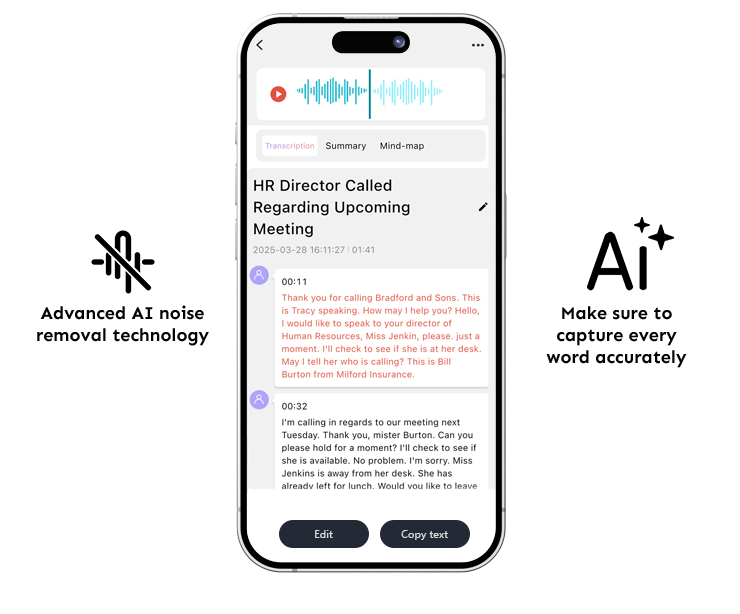
The UME AI Voice Recorder is special because of its smart AI-powered tools. These tools make recording easier and faster. It uses GPT-4 technology to turn speech into text with great accuracy. You can record sound and quickly change it into written words. This saves time and lets you focus on what matters.
The summarization tool picks out the main ideas from long recordings. You don’t have to listen to hours of audio to find key points. This feature is great for meetings, classes, or interviews. It helps you understand the important parts without extra work.
Noise removal makes your recordings clear by blocking background sounds. It works well in noisy places like schools or offices. Your audio will always sound sharp and easy to hear.
The recorder works with over 59 languages for transcription and translation. This is helpful for people who speak different languages or work globally. You can record in one language and change it into another easily. This makes communication simple and opens up new possibilities.
Callout: Features like transcription and summarization make handling recordings simple. They turn audio into useful information.
Connectivity options
The UME AI Voice Recorder connects easily to many devices. It works with both iOS and Android phones or tablets. You can link it to your device to check recordings anytime. This makes it easy to use with gadgets you already own.
The USB-C port helps with charging and moving files. You can quickly send recordings to your computer or cloud storage. This keeps your files neat and frees up space on the recorder. The USB-C port also makes charging simple wherever you are.
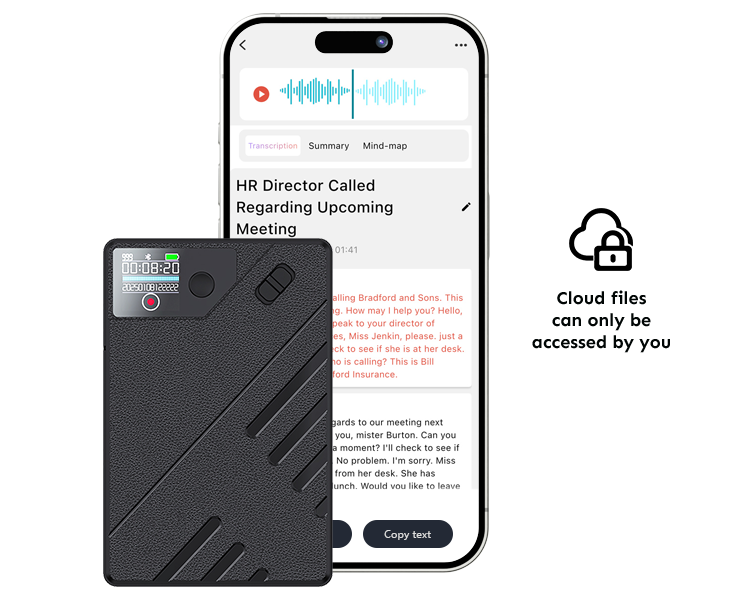
Cloud storage adds extra convenience. You can save your recordings online and get them from anywhere. This keeps your files safe and private. Only you can access them, giving you peace of mind.
Tip: Save your recordings in the cloud to keep them safe. This makes sure your files are easy to find later.
Unique Features of the UME AI Voice Recorder
Advanced AI transcription and summarization
The UME AI Voice Recorder uses smart AI technology to help you. It turns spoken words into text with great accuracy. This saves time since you don’t need to type recordings yourself. Use it for lectures, interviews, or meetings to capture every word easily.
The summarization tool makes long recordings shorter. It picks out the most important parts for you. This is helpful when you don’t have time to listen to everything. You can quickly review the key points instead of hours of audio.
Tip: Use the summary tool to make quick notes. It helps you stay organized during meetings or study time.
Noise-cancellation technology
Recording in noisy places is hard, but this device fixes that. Its noise-canceling feature blocks background sounds. This keeps your recordings clear and easy to hear.
Whether you’re in a busy café, classroom, or office, it works well. It only records the sounds you need, making it great for students, workers, or anyone needing clear audio.
Callout: Clear sound helps the AI tools work better. Your recordings will be more useful.
Ultra-slim and ergonomic design
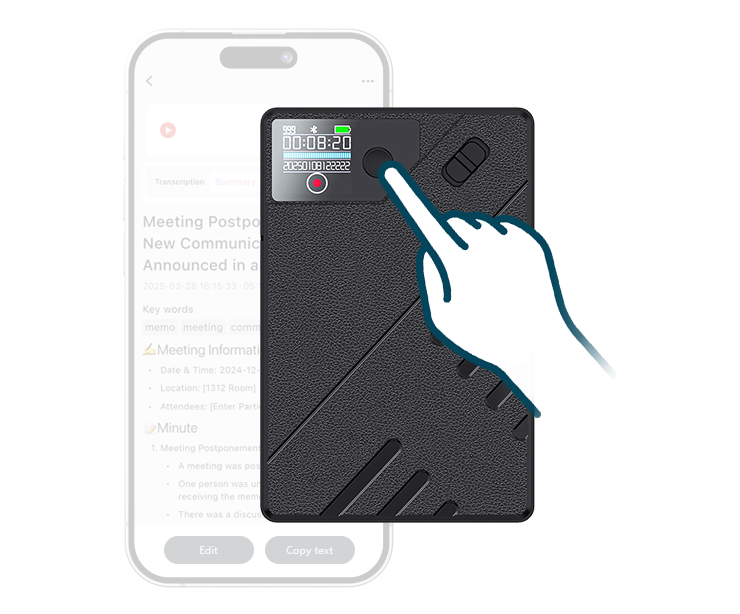
This recorder is slim and stylish. It’s only 0.31 inches thick, so it fits in your pocket or bag. It’s also lightweight, so you can carry it anywhere without trouble.
The design makes it easy to use. It fits nicely in your hand, and you can start recording with one touch. It’s simple for anyone to use, no matter their age or tech skills.
Note: The sleek design isn’t just pretty—it’s also handy for daily use.
Works with Many Devices
The UME AI Voice Recorder connects to different devices easily. It works well with both iOS and Android gadgets. You can link it to your phone or tablet and check recordings anytime. This makes it simple and handy to use.
Easy Use with iOS and Android
This recorder is made to work with iOS and Android systems. You don’t have to worry about it not working with your device. Just connect it, and it’s ready to use. Whether you have an iPhone, iPad, or Android phone, it works smoothly.
Tip: Make sure your device’s software is updated for the best connection.
USB-C for Quick Transfers
The USB-C port helps you move files fast. You can send recordings to your computer or other storage quickly. This keeps your files neat and saves time. The USB-C also makes charging simple, so one cable works for many devices.
Save Files in the Cloud
You can store your recordings online with cloud storage. This lets you get your files from anywhere. It keeps your recordings safe and private. Only you can see them, giving you peace of mind.
Why Connecting to Many Devices Helps
Using the recorder with different devices makes life easier. You can switch between gadgets without losing your recordings. This is great for students, workers, or anyone using multiple devices daily.
Callout: Being able to connect to many devices makes the recorder fit into your routine easily. It saves time and effort.
Main Advantages of Multi-Device Use
- Flexibility: Use it with iOS or Android devices.
- Ease: Move files fast with USB-C or save them online.
- Safety: Keep your recordings private with secure cloud storage.
- Convenience: Access your recordings anytime, no matter the device.
Note: The UME AI Voice Recorder is a smart pick for people who need a tool that works with many devices and is easy to use.
Benefits of Using the UME AI Voice Recorder
Boost productivity with AI tools
The UME AI Voice Recorder saves time with smart AI features. It turns speech into text right away, so you don’t need to type notes. The summarization tool picks out key ideas from long recordings. You can quickly see the main points without hearing the whole audio.
This device works in over 59 languages, making it great for global use. It’s helpful for international projects or conferences. The noise-canceling feature keeps audio clear, even in loud places. Clear sound helps the AI tools work better, making your tasks easier.
Tip: Use the summary tool to make quick notes. It keeps your work neat and simple.
Dependable for professionals
The UME AI Voice Recorder is perfect for busy workers. Its 64GB storage holds many recordings without running out of space. The strong battery lasts through long meetings or interviews. You can trust it to record everything without stopping.
Cloud storage keeps your files safe and private. Only you can access them, protecting sensitive information. This is great for handling important projects or contracts. It works with iOS and Android devices, letting you check recordings anytime.
Callout: Professionals can rely on this recorder for big tasks and secure storage.
Easy to use every day
The UME AI Voice Recorder is slim and light, so it’s easy to carry. It fits in your pocket or bag without trouble. You can start recording fast with one button.
The interface is simple, so anyone can use it easily. Students, journalists, and workers will find it handy. The USB-C port makes charging and file transfers quick and smooth.
Note: The simple design makes this recorder a great fit for daily use.
Long-term value and durability
The UME AI Voice Recorder is made to last a long time. Its strong build lets it handle daily use without breaking. You can carry it in your pocket or bag often, and it will still work well.
The recorder uses high-quality materials that resist scratches and small bumps. This means you won’t need to replace it soon, saving money. Its slim design looks nice and is tough enough for regular use.
Callout: A durable device like this gives you great value for your money.
The recorder’s AI-powered tools stay helpful over time. Features like transcription and summarization save effort and boost productivity. These tools make the recorder useful for years.
It also has 64GB of storage, which holds many recordings. You won’t run out of space, even after using it for a long time. Cloud storage adds extra value by keeping your files safe and easy to reach.
-
Key benefits of long-term use:
- Strong materials for daily use.
- Smart AI tools that stay useful.
- Large storage for many recordings.
- Safe cloud storage for your files.
Tip: Update the software often to keep the recorder working well.
The UME AI Voice Recorder mixes durability with advanced features. It’s a smart pick for anyone needing a reliable tool that lasts.
Comparison with Other AI Voice Recorders
Key differences in specifications and features
The UME AI Voice Recorder stands out from others. Many recorders only handle basic tasks, but UME does more. It uses GPT-4 technology for accurate transcription and summaries. This feature is rare in similar devices. It also supports over 59 languages, making it great for global users.
Some recorders don’t have noise-canceling or enough storage. The UME recorder has 64GB of space, perfect for long projects. Its slim design, just 0.31 inches thick, makes it easy to carry. It’s lighter and smaller than many other recorders.
Tip: Always check a device’s specs to see if it fits your needs.
Price-to-performance comparison
The UME AI Voice Recorder is a great deal for $97.99. It offers advanced features like live transcription, noise removal, and language support. Many recorders at this price don’t include these tools.
Cheaper recorders under $100 often lack smart AI-powered features. Others with similar abilities can cost over $150. The UME recorder is affordable and performs well. It’s a good choice for students, workers, or anyone needing audio tools.
Callout: The UME recorder gives you great features for its price.
User feedback and reviews
People love the UME AI Voice Recorder for being reliable and simple. They like its accurate transcription and summaries, which save time. Workers trust its cloud storage to keep important files safe.
Students say the noise-canceling helps with clear lecture recordings. Its slim size and one-touch recording are also popular. Overall, users rate it highly for its smart features and easy design.
Note: Reading reviews shows how a device works in real life.
Buying Guide for AI Voice Recorders
Things to think about when picking a voice recorder
When choosing a voice recorder, focus on its main features. First, check how clear the sound is. A recorder with noise-canceling makes audio better in loud places. Next, look at storage space. Devices with 64GB can hold many recordings, great for long projects. Battery life is also important. A strong battery lasts through long meetings or classes.
Make sure the recorder works with your devices. One that connects to both iOS and Android is more useful. Features like USB-C and cloud storage make saving and sharing files simple. Also, look for smart tools like transcription and summarization. These save time and help you work faster.
Tip: Compare different models to find the one that fits your needs best.
Picking features based on what you need
Choose a recorder that matches what you’ll use it for. If you attend long events, pick one with a big battery and lots of storage. For projects in different languages, get one that supports many languages. If you’re in noisy places, noise-canceling is a must.
If you handle private information, look for secure cloud storage. Students might want a small, light recorder for easy carrying. Smart tools like summarization are great for saving time. By matching the recorder’s features to your tasks, you’ll make a better choice.
Callout: Choosing a recorder that fits your needs makes it work better for you.
How to find good deals
Getting a good recorder at a fair price takes some effort. Start by checking online stores and comparing prices. Look for sales or discounts to save money. Some brands offer free shipping or easy returns, which add extra value.
Read customer reviews to learn how the recorder works. Reviews often show what’s good or bad about it. Buying from the brand’s website can ensure you get a real product and good support. Before buying, make sure the recorder meets your needs.
Note: Doing some research can help you find a recorder that’s both affordable and high-quality.
The UME AI Voice Recorder mixes smart AI features with an easy-to-use design. Its GPT-4-powered transcription, noise cancellation, and smart summarization help you handle audio better. With 64GB storage and support for 59+ languages, it’s great for students, workers, or anyone needing quick results.
Callout: Use it for meetings, classes, or interviews. It makes recording simple and helps you get more done.
Try the UME AI Voice Recorder now and see how it improves your audio tasks.
FAQ
How many languages does the UME AI Voice Recorder support?
The recorder works with over 59 languages. It can transcribe and translate recordings into different languages. This makes it great for people around the world.
Tip: Use this for global meetings or multilingual tasks.
Is the UME AI Voice Recorder compatible with all devices?
Yes, it connects to both iOS and Android devices. You can use it with your phone or tablet to check recordings anytime. The USB-C port helps you quickly move files to your computer.
Callout: Keep your device updated for the best performance.
How long does the battery last?
The battery lasts several hours on one charge. It’s great for long classes, meetings, or interviews. You can recharge it fast with the USB-C port, so it’s always ready.
Note: A strong battery keeps you working without interruptions.
Can I store my recordings securely?
Yes, you can save your recordings in secure cloud storage. Only you can access them, keeping your files private and safe. This is helpful for storing important information.
Callout: Use cloud storage to protect and access your recordings easily.
What makes the UME AI Voice Recorder unique?
Its smart AI tools make it special. It can transcribe speech, summarize audio, and block noise instantly. The slim design and 64GB storage make it easy to carry and use daily.
Emoji: ✨ Try this advanced device for smarter recording!


0 comments